TeleCash
Merchant Online Portal
In TeleCash's Merchant Online Portal, you can access the invoices for your credit card acceptance and view your transactions.
TeleCash
Our partner for processing card payments. By signing the payment processing agreements, you enter into a contract with TeleCash.
Credit card
TeleCash settles credit card payments directly with you. The invoices for this are available in the Merchant Online Portal.
Girocard
The fee invoices for your Girocard payments, on the other hand, come from SENVEND.
SENVEND has no insight into thisTeleCash is your direct contract partner for credit card payments. That's why we don't see the billing for these payments and unfortunately can't help you with problems related to the portal.
Registration in the Merchant Online Portal
Here's how to set up your access. TeleCash sends you the details by email.
Wait for two emails from TeleCash
Once your credit card onboarding is complete, TeleCash sends you two separate emails.
Open the portal
Go to mop.telecash.de .
Log in for the first time
Enter your username and the initial password from the second email.
Set up two-factor authentication
You'll be prompted right away to set up two-factor authentication for your account. You'll find the matching guides from TeleCash in the next section.
Log in with a passcode from now on
After that, you log in with your credentials and the passcode from your two-factor authentication.
Initial password is only valid for 24 hoursIf your password has expired, just reply to the email from TeleCash and ask for it to be resent.
Two-factor authentication
TeleCash provides two guides, depending on whether you want to set up two-factor authentication in your browser or on your smartphone.
Download invoices
Your statements are in the portal under Statements and can be downloaded in four file formats.
Open Abrechnungen & Reports (billing & reports)
In the portal, click the Abrechnungen & Reports (billing & reports) tab at the top.
Open Statements
In the row for your merchant account, click Statements in the Aktion (action) column.
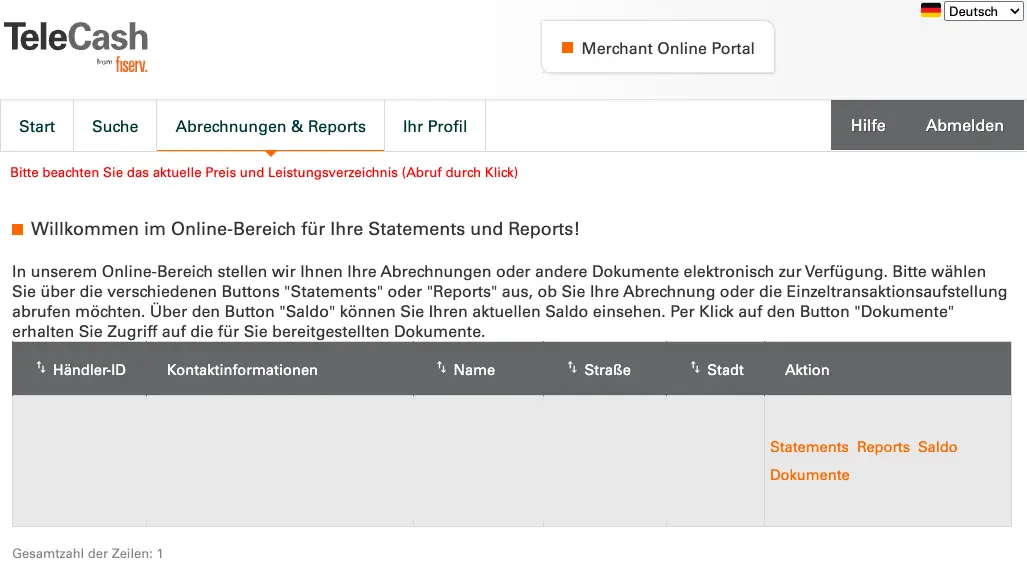
The Abrechnungen & Reports (billing & reports) tab. In the Aktion (action) column, you'll find the Statements link.
Download a billing period
In the Aktionen (actions) column, click one of the links to download the statements for the billing period you want.
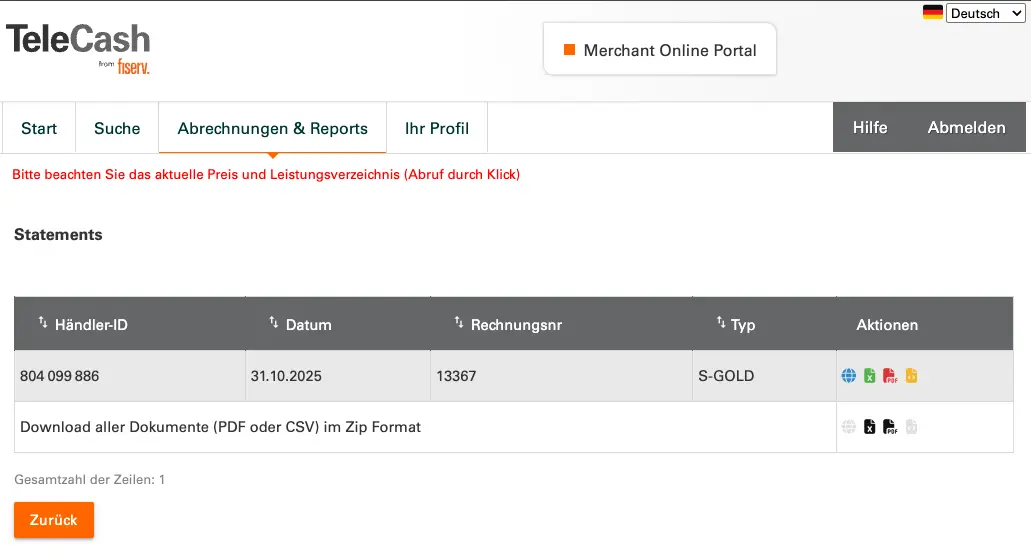
The list of statements. In the Aktionen (actions) column, you choose the file format.
Problems and support
TeleCash helps you with the portalIf you run into problems with registration, logging in, or downloading your invoices, please contact TeleCash directly. SENVEND isn't responsible for credit card processing and unfortunately can't help you with that.
You can reach TeleCash through the contact form or chat on telecash.de.
Frequently asked questions
What does TeleCash do?
TeleCash is our partner for processing card payments. By signing the payment processing agreements, you enter into a contract with TeleCash. TeleCash manages the payments and transfers them to you. TeleCash settles credit card payments directly with you, while the fee invoices for Girocard payments come from SENVEND.
What do I need the Merchant Online Portal for?
TeleCash is your direct contract partner for credit card payments, which is why SENVEND has no insight into this billing. In the Merchant Online Portal, you get your invoices from TeleCash and can view your transactions.
How do I get an account for the Merchant Online Portal?
Once your credit card onboarding is complete, you'll get an email from TeleCash with a link to the Merchant Online Portal. You'll find how to set up your access above, in the Registration section.
Can I get the invoices by email?
No, unfortunately sending them by email isn't possible for data protection reasons.
TeleCash
Merchant Online Portal
In TeleCash's Merchant Online Portal, you can access the invoices for your credit card acceptance and view your transactions.
TeleCash
Our partner for processing card payments. By signing the payment processing agreements, you enter into a contract with TeleCash.
Credit card
TeleCash settles credit card payments directly with you. The invoices for this are available in the Merchant Online Portal.
Girocard
The fee invoices for your Girocard payments, on the other hand, come from SENVEND.
SENVEND has no insight into thisTeleCash is your direct contract partner for credit card payments. That's why we don't see the billing for these payments and unfortunately can't help you with problems related to the portal.
Registration in the Merchant Online Portal
Here's how to set up your access. TeleCash sends you the details by email.
Wait for two emails from TeleCash
Once your credit card onboarding is complete, TeleCash sends you two separate emails.
Open the portal
Go to mop.telecash.de .
Log in for the first time
Enter your username and the initial password from the second email.
Set up two-factor authentication
You'll be prompted right away to set up two-factor authentication for your account. You'll find the matching guides from TeleCash in the next section.
Log in with a passcode from now on
After that, you log in with your credentials and the passcode from your two-factor authentication.
Initial password is only valid for 24 hoursIf your password has expired, just reply to the email from TeleCash and ask for it to be resent.
Two-factor authentication
TeleCash provides two guides, depending on whether you want to set up two-factor authentication in your browser or on your smartphone.
Download invoices
Your statements are in the portal under Statements and can be downloaded in four file formats.
Open Abrechnungen & Reports (billing & reports)
In the portal, click the Abrechnungen & Reports (billing & reports) tab at the top.
Open Statements
In the row for your merchant account, click Statements in the Aktion (action) column.
The Abrechnungen & Reports (billing & reports) tab. In the Aktion (action) column, you'll find the Statements link.
Download a billing period
In the Aktionen (actions) column, click one of the links to download the statements for the billing period you want.
The list of statements. In the Aktionen (actions) column, you choose the file format.
Problems and support
TeleCash helps you with the portalIf you run into problems with registration, logging in, or downloading your invoices, please contact TeleCash directly. SENVEND isn't responsible for credit card processing and unfortunately can't help you with that.
You can reach TeleCash through the contact form or chat on telecash.de.
Frequently asked questions
What does TeleCash do?
TeleCash is our partner for processing card payments. By signing the payment processing agreements, you enter into a contract with TeleCash. TeleCash manages the payments and transfers them to you. TeleCash settles credit card payments directly with you, while the fee invoices for Girocard payments come from SENVEND.
What do I need the Merchant Online Portal for?
TeleCash is your direct contract partner for credit card payments, which is why SENVEND has no insight into this billing. In the Merchant Online Portal, you get your invoices from TeleCash and can view your transactions.
How do I get an account for the Merchant Online Portal?
Once your credit card onboarding is complete, you'll get an email from TeleCash with a link to the Merchant Online Portal. You'll find how to set up your access above, in the Registration section.
Can I get the invoices by email?
No, unfortunately sending them by email isn't possible for data protection reasons.