Accounting
Accounting and statements
With the SENVEND app you get legally compliant statements and can export your accounting data easily. Here you find which reports there are, where you find them and how to set up the DATEV export.
Monthly statement
Your revenue report as a PDF – serves as a tax report for your bookkeeping.
DATEV file
For your tax advisor. Has to be set up once.
Sales export
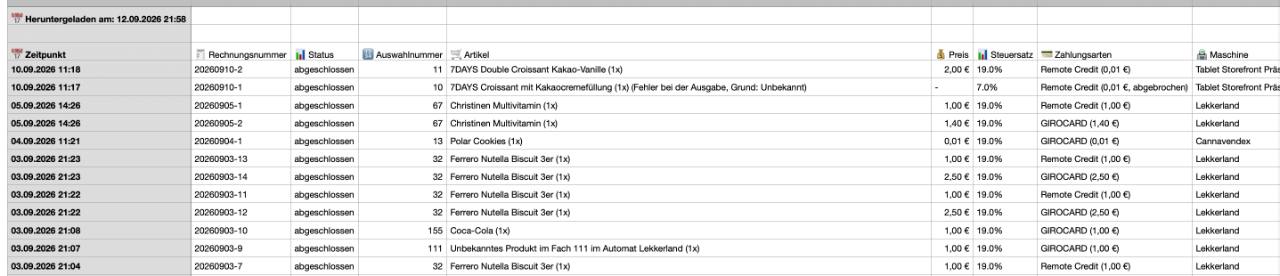
Every single transaction as a table – for accounting and your own analyses.
Monthly statements
The SENVEND telemetry creates statements for your tax advisor every month. They serve for legally compliant bookkeeping and list all sales.
Open Verwaltung (Administration)
In my.SENVEND go to Verwaltung (Administration) and then to Abrechnungen (statements).
View the statement
Use Anschauen (view) to open the statement of the month you need.
Download as PDF
From there you download the statement as a PDF file and pass it on to your tax advisor.
RequirementThe monthly statements are created by the SENVEND telemetry. So you receive them if you use our telemetry.
Setting up the DATEV export
To get your statement as a DATEV file as well, you have to store the DATEV settings in your company once.
Edit your company (Unternehmen)
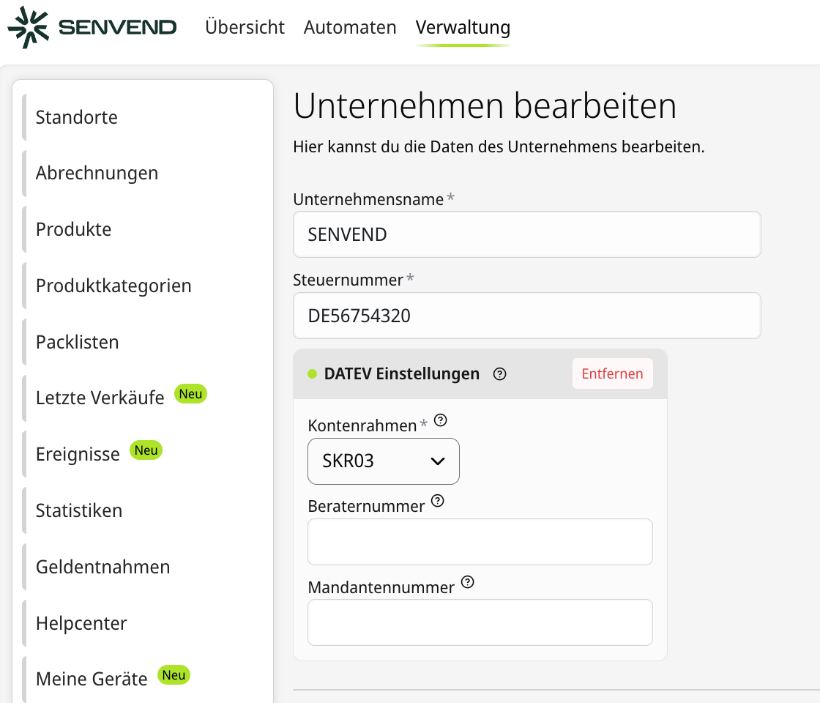
Go to Verwaltung (Administration) and then to Unternehmen (company). There you edit your company data. Unternehmensname (company name) and Steuernummer (tax number) have to be filled in.
Activate the DATEV Einstellungen
Open the section DATEV Einstellungen (DATEV settings).
Select the chart of accounts (Kontenrahmen)
Select the chart of accounts your tax advisor works with: SKR03 or SKR04. The Kontenrahmen is a required field, just like the Steuernummer (tax number) of your company.
Beraternummer (consultant number) and Mandantennummer (client number)
You get these two numbers from your tax advisor. Enter them so that the DATEV file can be assigned to your mandate correctly.
Save
Save your changes. The DATEV export is now set up for your company.
From when is the DATEV file available?As soon as the DATEV settings are stored, the DATEV file is available for download on the 1st of the following month, in addition to the statement PDF. It is not created retroactively.
Which chart of accounts is the right one?SKR03 and SKR04 are two different standard charts of accounts. Which one you need depends on how your bookkeeping is done – if in doubt, just ask your tax advisor.
Sales export
The sales export gives you every single transaction as a table – for your accounting or for your own analyses.
Open Letzte Verkäufe (recent sales)
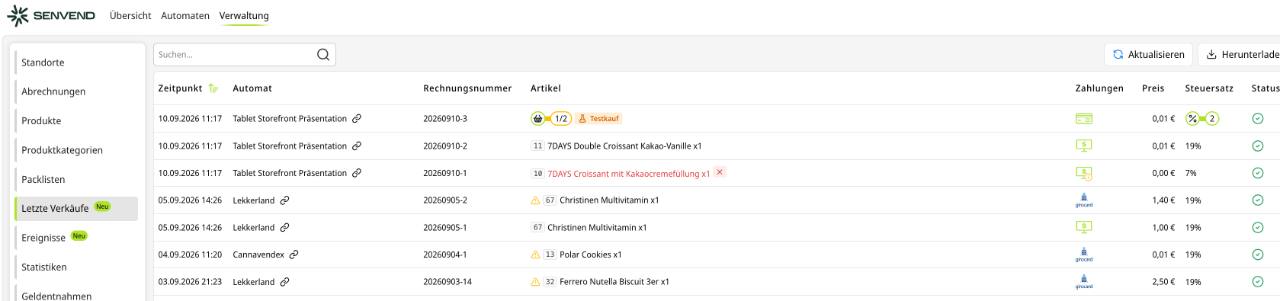
Go to Verwaltung (Administration) and then to Letzte Verkäufe (recent sales). Alternatively you first select a machine and then go to Letzte Verkäufe.
Herunterladen (download)
At the top right you click on Herunterladen (download). You receive the sales report as a table.
What is in which report?
The two reports answer different questions. The revenue report summarises, the sales export shows every single booking.
Revenue report (PDF)
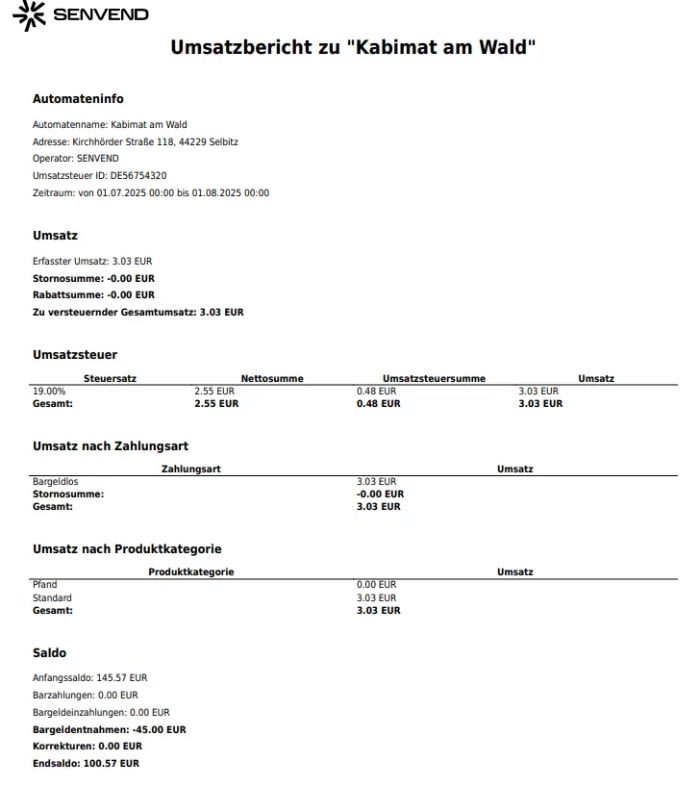
NoteVAT is calculated horizontally – i.e. per tax rate on the total of all sales in the billing period, not individually per transaction.
Sales export (table)
Frequently asked questions
Where do I find my monthly statements?
Under Verwaltung and there under Abrechnungen. Use Anschauen to open the statement and download it as a PDF.
How do I get the statement for DATEV?
Under Verwaltung and there under Unternehmen, edit your company and store the DATEV Einstellungen with the right Kontenrahmen (chart of accounts). As soon as that is saved, the DATEV file is available for download on the 1st of the following month, in addition to the statement PDF.
Which chart of accounts do I have to select?
You can choose between SKR03 and SKR04. Which one is right depends on how your bookkeeping is done. If in doubt, ask your tax advisor.
Which fields do I have to fill in for DATEV?
The required fields are the Steuernummer (tax number) of your company and the Kontenrahmen (chart of accounts). You get the Beraternummer (consultant number) and the Mandantennummer (client number) from your tax advisor – enter them as well so that the DATEV file can be assigned to your mandate.
Do I also get the DATEV file retroactively?
No. The DATEV file is provided from the 1st of the month following the setup.
How do I export individual sales?
Under Verwaltung and there under Letzte Verkäufe you can export the sales report at the top right via Herunterladen as a table. Alternatively this also works directly on a single machine.
Do I need the SENVEND telemetry for the statements?
Yes. The monthly statements are created by the SENVEND telemetry.
Any questions about accounting?
We help you with questions about statements, exports and setting up DATEV.

 +49 231 4499210
Accounting
Accounting and statements
With the SENVEND app you get legally compliant statements and can export your accounting data easily. Here you find which reports there are, where you find them and how to set up the DATEV export.
Monthly statement
Your revenue report as a PDF – serves as a tax report for your bookkeeping.
DATEV file
For your tax advisor. Has to be set up once.
Sales export
Every single transaction as a table – for accounting and your own analyses.
Monthly statements
The SENVEND telemetry creates statements for your tax advisor every month. They serve for legally compliant bookkeeping and list all sales.
Open Verwaltung (Administration)
In my.SENVEND go to Verwaltung (Administration) and then to Abrechnungen (statements).
View the statement
Use Anschauen (view) to open the statement of the month you need.
Download as PDF
From there you download the statement as a PDF file and pass it on to your tax advisor.
RequirementThe monthly statements are created by the SENVEND telemetry. So you receive them if you use our telemetry.
Setting up the DATEV export
To get your statement as a DATEV file as well, you have to store the DATEV settings in your company once.
Edit your company (Unternehmen)
Go to Verwaltung (Administration) and then to Unternehmen (company). There you edit your company data. Unternehmensname (company name) and Steuernummer (tax number) have to be filled in.
Activate the DATEV Einstellungen
Open the section DATEV Einstellungen (DATEV settings).
Select the chart of accounts (Kontenrahmen)
Select the chart of accounts your tax advisor works with: SKR03 or SKR04. The Kontenrahmen is a required field, just like the Steuernummer (tax number) of your company.
Beraternummer (consultant number) and Mandantennummer (client number)
You get these two numbers from your tax advisor. Enter them so that the DATEV file can be assigned to your mandate correctly.
Save
Save your changes. The DATEV export is now set up for your company.
From when is the DATEV file available?As soon as the DATEV settings are stored, the DATEV file is available for download on the 1st of the following month, in addition to the statement PDF. It is not created retroactively.
Which chart of accounts is the right one?SKR03 and SKR04 are two different standard charts of accounts. Which one you need depends on how your bookkeeping is done – if in doubt, just ask your tax advisor.
Sales export
The sales export gives you every single transaction as a table – for your accounting or for your own analyses.
Open Letzte Verkäufe (recent sales)
Go to Verwaltung (Administration) and then to Letzte Verkäufe (recent sales). Alternatively you first select a machine and then go to Letzte Verkäufe.
Herunterladen (download)
At the top right you click on Herunterladen (download). You receive the sales report as a table.
What is in which report?
The two reports answer different questions. The revenue report summarises, the sales export shows every single booking.
Revenue report (PDF)
NoteVAT is calculated horizontally – i.e. per tax rate on the total of all sales in the billing period, not individually per transaction.
Sales export (table)
Frequently asked questions
Where do I find my monthly statements?
Under Verwaltung and there under Abrechnungen. Use Anschauen to open the statement and download it as a PDF.
How do I get the statement for DATEV?
Under Verwaltung and there under Unternehmen, edit your company and store the DATEV Einstellungen with the right Kontenrahmen (chart of accounts). As soon as that is saved, the DATEV file is available for download on the 1st of the following month, in addition to the statement PDF.
Which chart of accounts do I have to select?
You can choose between SKR03 and SKR04. Which one is right depends on how your bookkeeping is done. If in doubt, ask your tax advisor.
Which fields do I have to fill in for DATEV?
The required fields are the Steuernummer (tax number) of your company and the Kontenrahmen (chart of accounts). You get the Beraternummer (consultant number) and the Mandantennummer (client number) from your tax advisor – enter them as well so that the DATEV file can be assigned to your mandate.
Do I also get the DATEV file retroactively?
No. The DATEV file is provided from the 1st of the month following the setup.
How do I export individual sales?
Under Verwaltung and there under Letzte Verkäufe you can export the sales report at the top right via Herunterladen as a table. Alternatively this also works directly on a single machine.
Do I need the SENVEND telemetry for the statements?
Yes. The monthly statements are created by the SENVEND telemetry.
Any questions about accounting?
We help you with questions about statements, exports and setting up DATEV.