Installation guide
Installing the UX700
Step-by-step guide to mounting, wiring and starting up your SENVEND UX700 payment terminal.
Preparation
Required items
Tools
- Phillips screwdriver
- Small socket set
SENVEND items
- UX700 payment terminal
- Mounting frame
- MDB Y-cable
- Screws
- Teltonika LTE router
- Teltonika LAN cable
- Teltonika power cable
- Teltonika rod antenna
- Teltonika cable antenna
Tools
- Phillips screwdriver
- Small socket set
SENVEND items
- UX700 payment terminal
- Mounting frame
- MDB adapter
- MDB cable
- MDB adapter power cable
- MDB adapter USB-C cable
- Screws
- Teltonika LTE router
- Teltonika LAN cable
- Teltonika power cable
- Teltonika rod antenna
- Teltonika cable antenna
Step 1
Mounting the terminal
Push the terminal through the EVA cutout.
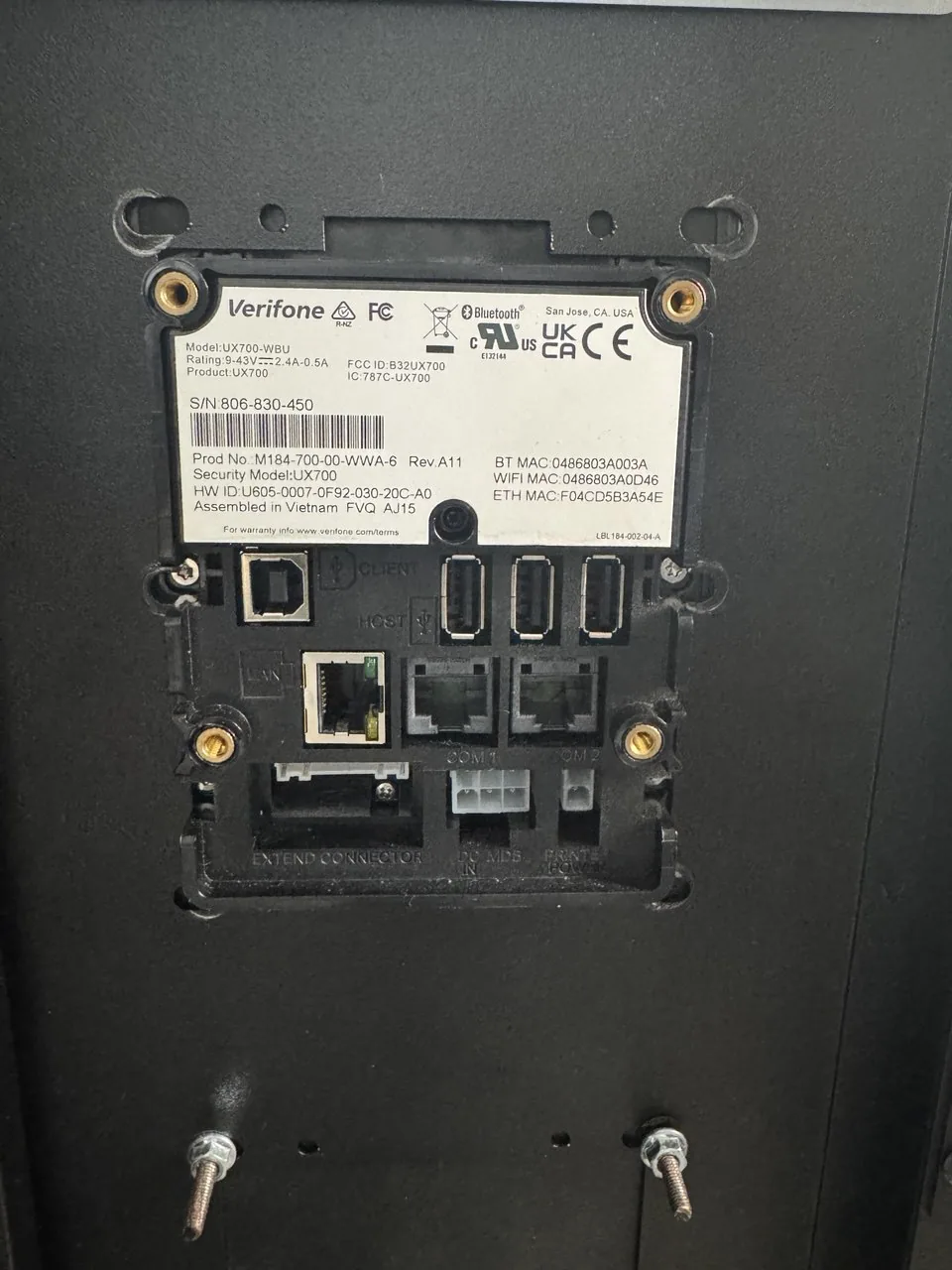
Fit the mounting frame onto the terminal from the inside.
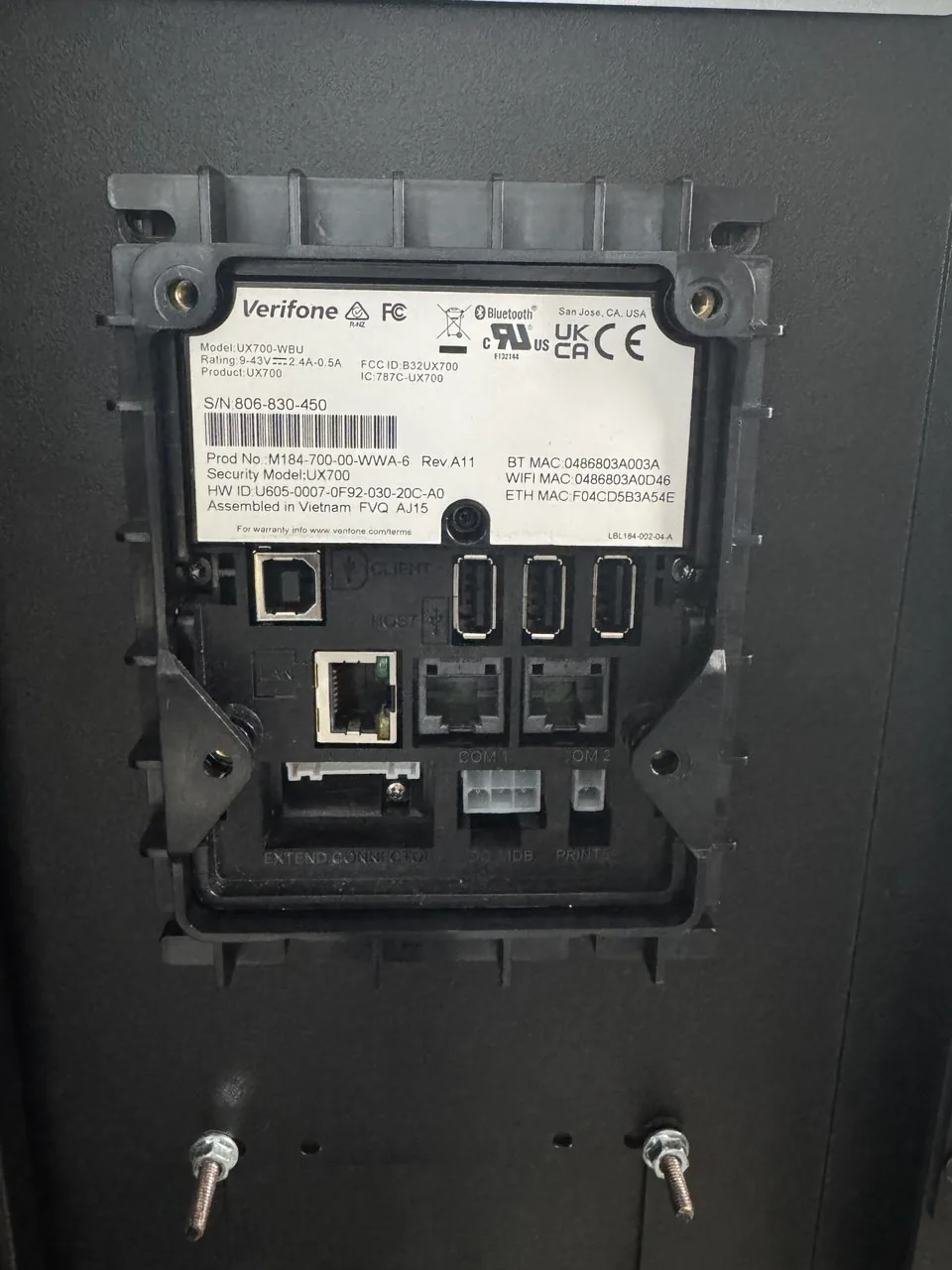
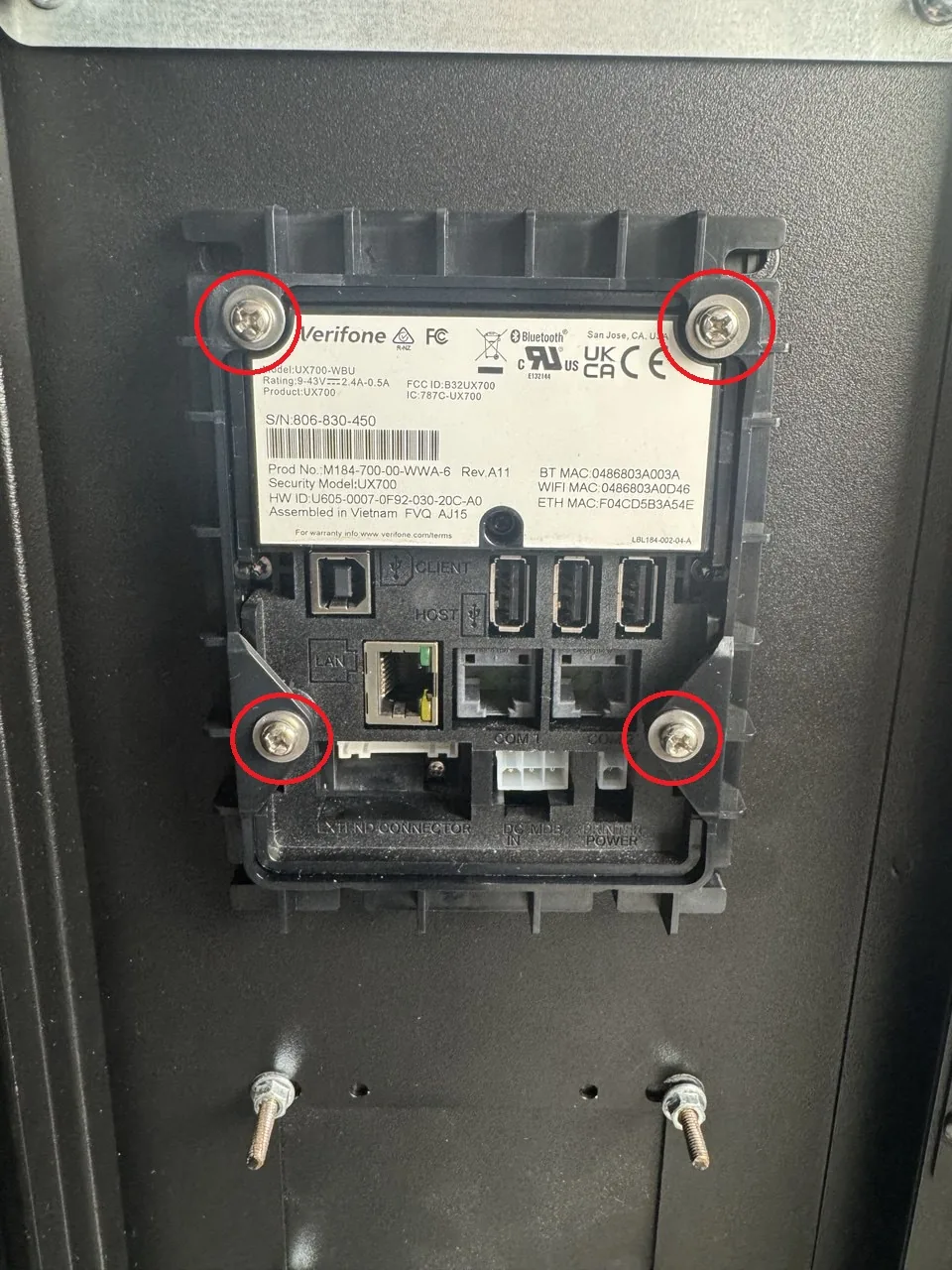
Screw the mounting frame to the terminal using the four supplied screws.
Step 2
Connecting the terminal
Connect the SENVEND terminal to the MDB bus using the MDB Y-cable.
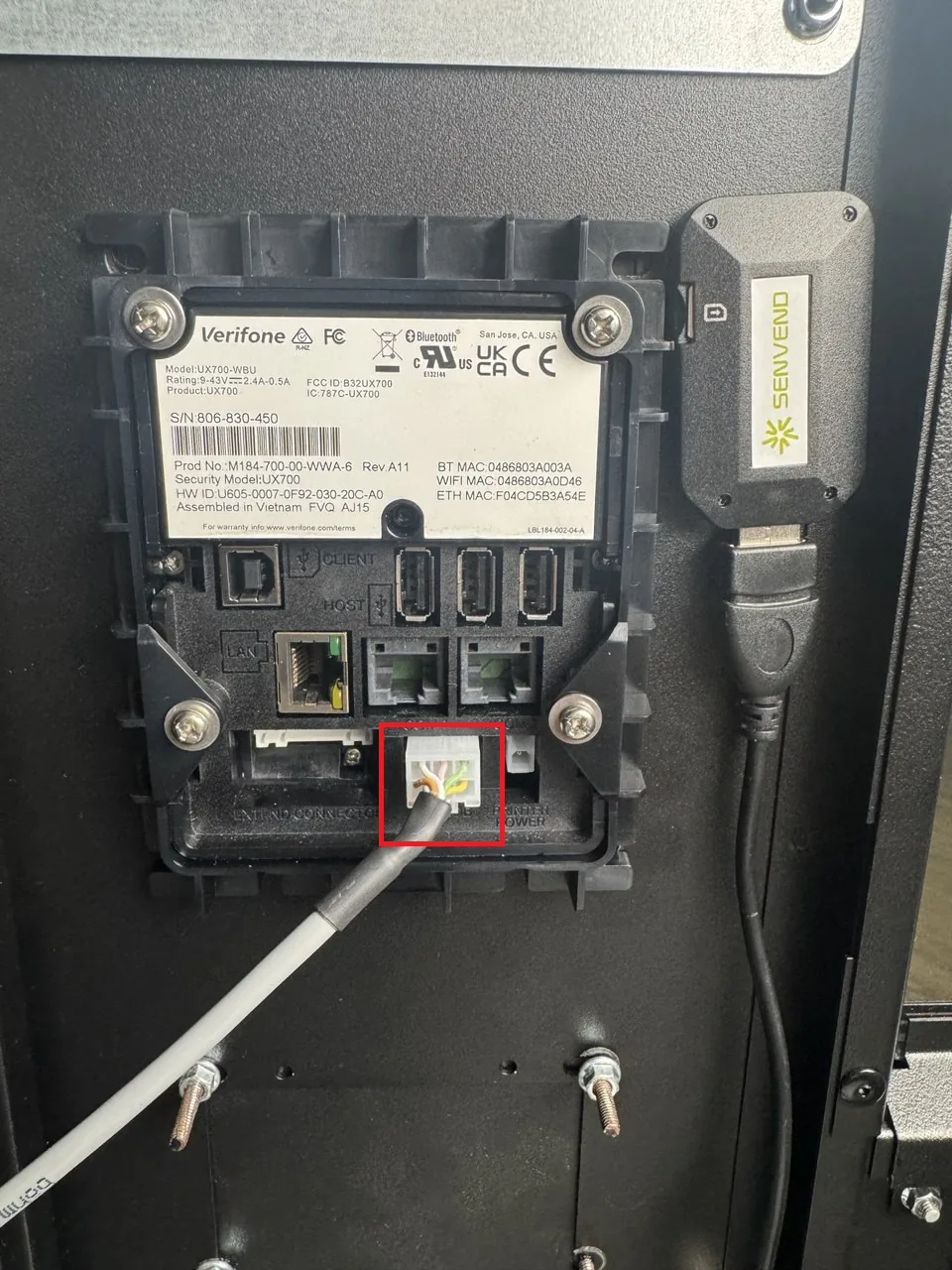
Screw on the Teltonika RUT200 antennas (1x mobile rod antenna, 1x mobile cable antenna, Wi-Fi antenna if needed).
Connect the RUT200 LAN port to the UX700 LAN port (note: use the silver LAN port on the UX700).
Plug the Teltonika power cable into the router.
Plug the Teltonika power cable onto the VMC.
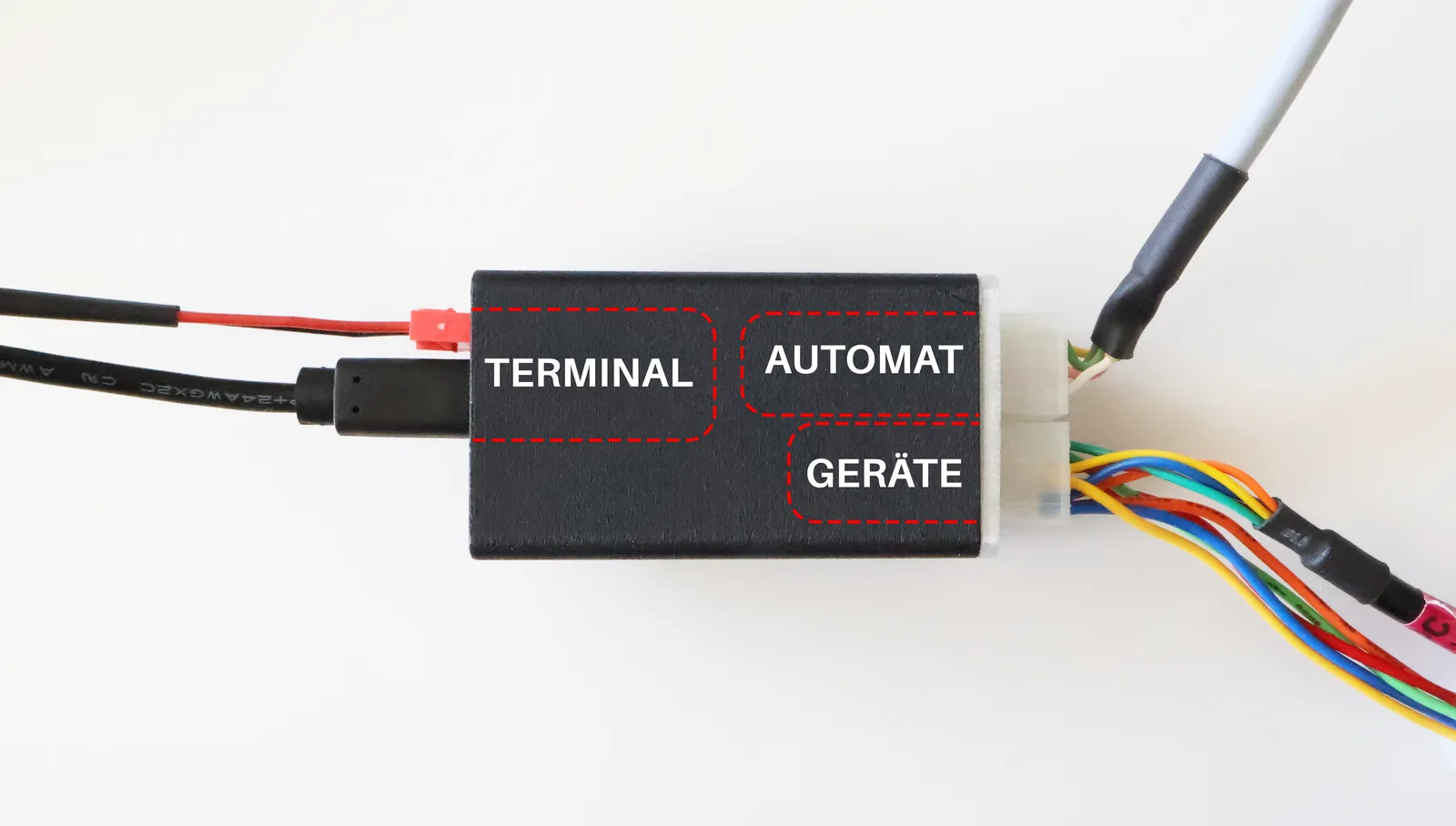
Connect the UX700 payment terminal to the MDB adapter
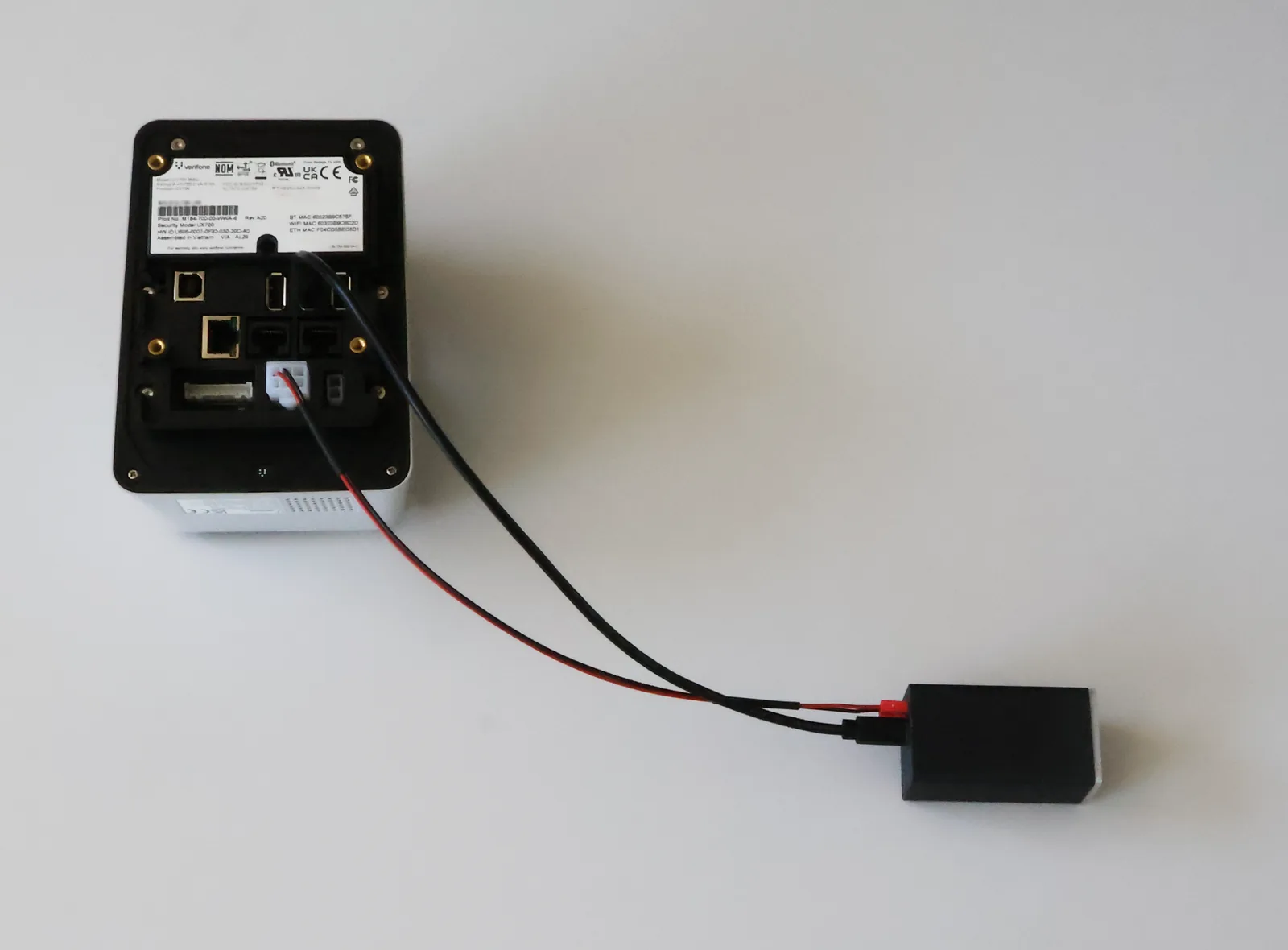
Connect the UX700 payment terminal to the MDB adapter using the USB-C cable. You can use any of the terminal’s three USB ports. Then plug one end of the power cable into the matching socket on the MDB adapter and the other end into the MDB socket of the UX700 payment terminal. Make sure all connectors are fully inserted and the cables are not under tension.
Connect the MDB adapter to the vending machine controller
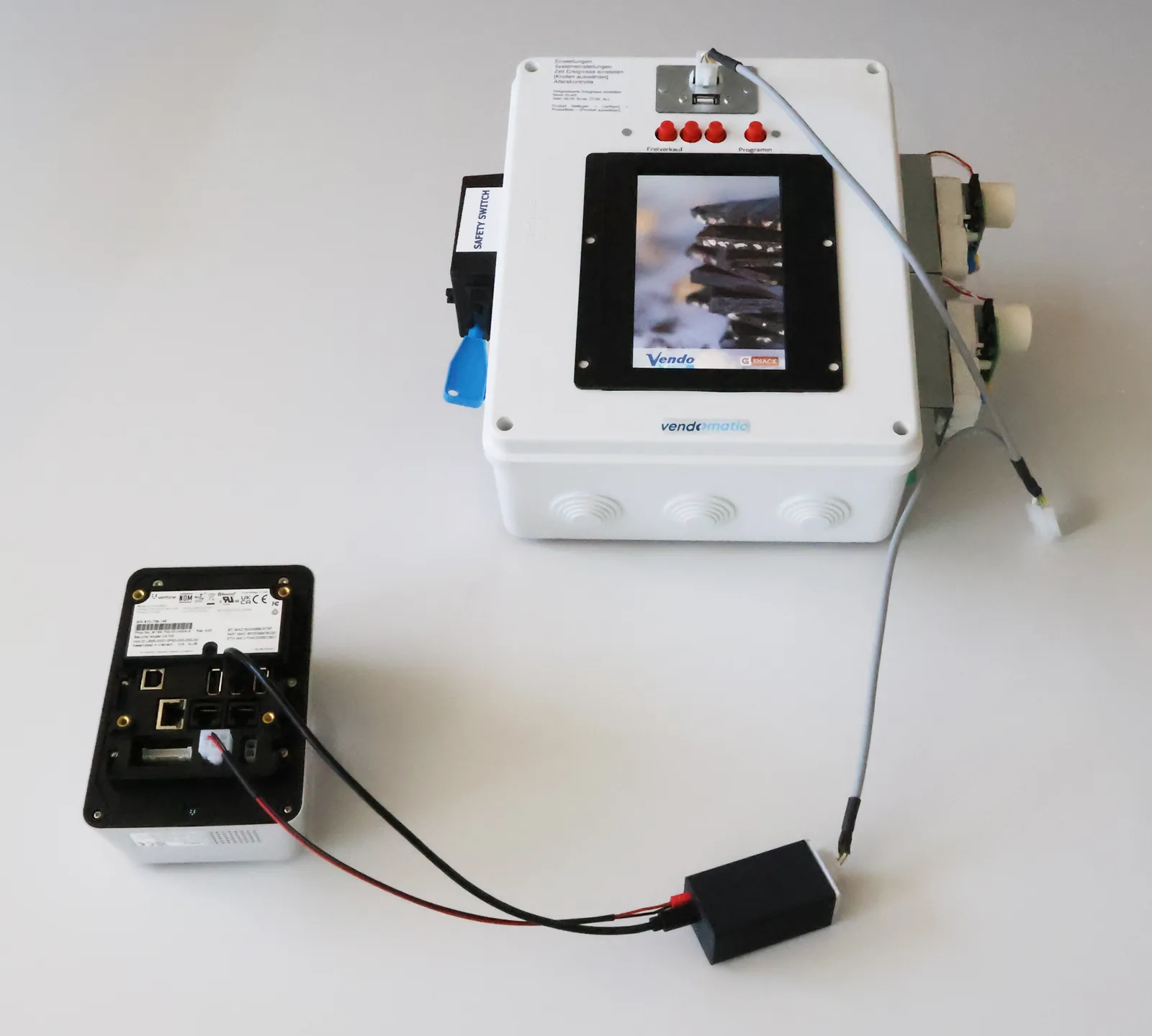
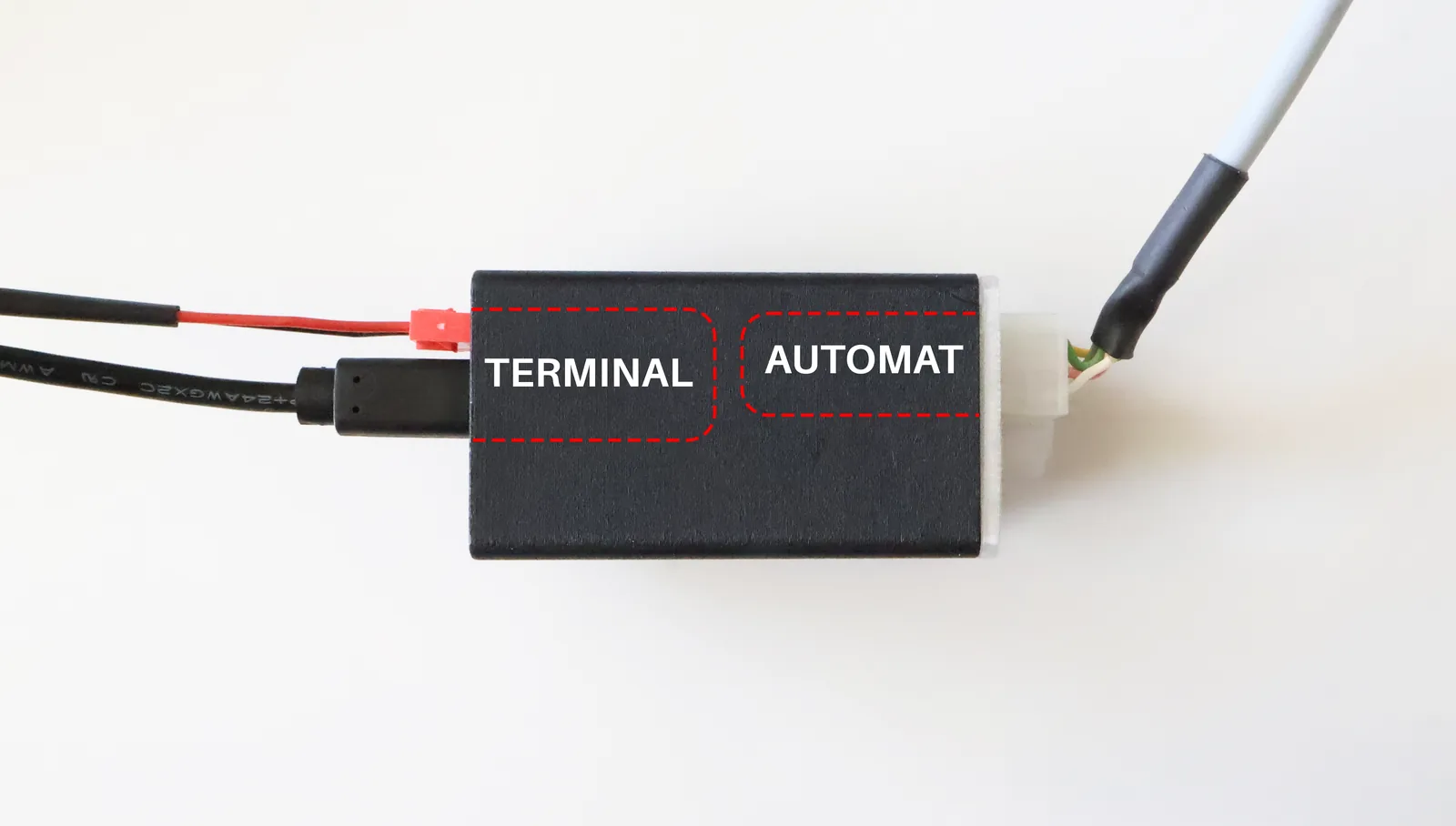
Plug the MDB cable into the socket labelled AUTOMAT (machine) on the MDB adapter and connect the other end to the MDB port on the vending machine controller board.
Connect peripherals to the MDB adapter
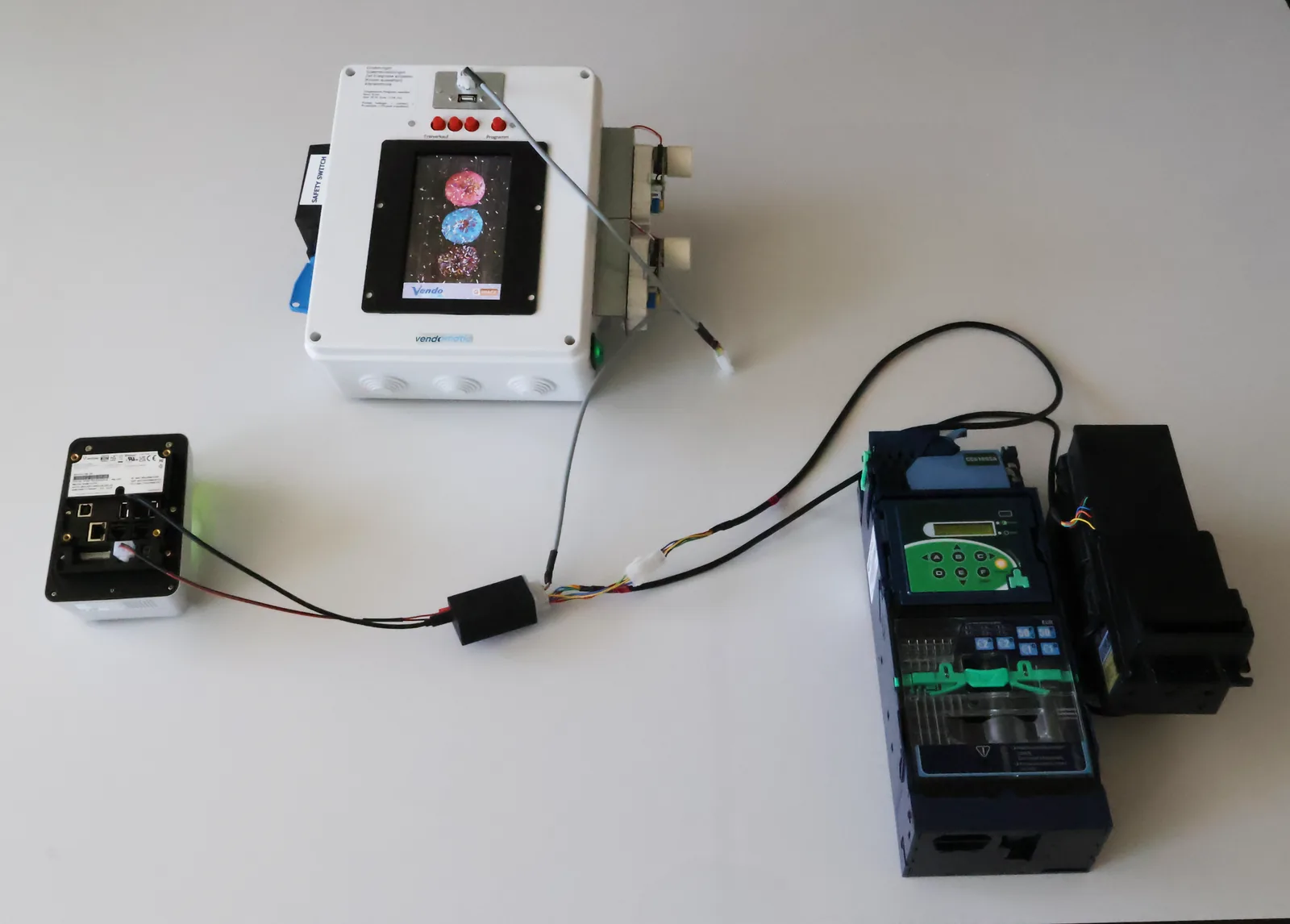
Connect existing peripherals such as coin mechanisms or bill validators to the socket labelled GERÄTE (devices) on the MDB adapter. This keeps all devices connected to the vending machine via the MDB adapter. Then switch the vending machine back on.
Screw on the Teltonika RUT200 antennas (1x mobile rod antenna, 1x mobile cable antenna, Wi-Fi antenna if needed).
Connect the RUT200 LAN port to the UX700 LAN port (note: use the silver LAN port on the UX700).
Plug the Teltonika power cable into the router.
Plug the Teltonika power cable onto the VMC.
Step 3
Starting the terminal
Switch on the power to the vending machine.
Wait until the terminal has fully booted and the green screensaver stays on.
Check whether the lights on the terminal’s LAN port are on or flashing. If not, check the LTE router wiring again.
Wait another five minutes, as the terminal may automatically download and install updates.
Step 4
Testing payments and age verification
Select a product on your vending machine.
Make a payment.
If applicable, test age verification on the SENVEND terminal.
Step 5
Setting up telemetry
You can use your terminal for telemetry or age verification even before your onboarding is complete. The terminal is fully functional – only payments can’t be processed yet. At my.senvend.com you can already enter all your data.
Continue to telemetry setupQuestions about the installation?
Write to us via the help form or get in touch directly – we’re happy to help.



Installation guide
Installing the UX700
Step-by-step guide to mounting, wiring and starting up your SENVEND UX700 payment terminal.
Preparation
Required items
Tools
- Phillips screwdriver
- Small socket set
SENVEND items
- UX700 payment terminal
- Mounting frame
- MDB Y-cable
- Screws
- Teltonika LTE router
- Teltonika LAN cable
- Teltonika power cable
- Teltonika rod antenna
- Teltonika cable antenna
Tools
- Phillips screwdriver
- Small socket set
SENVEND items
- UX700 payment terminal
- Mounting frame
- MDB adapter
- MDB cable
- MDB adapter power cable
- MDB adapter USB-C cable
- Screws
- Teltonika LTE router
- Teltonika LAN cable
- Teltonika power cable
- Teltonika rod antenna
- Teltonika cable antenna
Step 1
Mounting the terminal
Push the terminal through the EVA cutout.
Fit the mounting frame onto the terminal from the inside.
Screw the mounting frame to the terminal using the four supplied screws.
Step 2
Connecting the terminal
Connect the SENVEND terminal to the MDB bus using the MDB Y-cable.
Screw on the Teltonika RUT200 antennas (1x mobile rod antenna, 1x mobile cable antenna, Wi-Fi antenna if needed).
Connect the RUT200 LAN port to the UX700 LAN port (note: use the silver LAN port on the UX700).
Plug the Teltonika power cable into the router.
Plug the Teltonika power cable onto the VMC.
Connect the UX700 payment terminal to the MDB adapter
Connect the UX700 payment terminal to the MDB adapter using the USB-C cable. You can use any of the terminal’s three USB ports. Then plug one end of the power cable into the matching socket on the MDB adapter and the other end into the MDB socket of the UX700 payment terminal. Make sure all connectors are fully inserted and the cables are not under tension.
Connect the MDB adapter to the vending machine controller
Plug the MDB cable into the socket labelled AUTOMAT (machine) on the MDB adapter and connect the other end to the MDB port on the vending machine controller board.
Connect peripherals to the MDB adapter
Connect existing peripherals such as coin mechanisms or bill validators to the socket labelled GERÄTE (devices) on the MDB adapter. This keeps all devices connected to the vending machine via the MDB adapter. Then switch the vending machine back on.
Screw on the Teltonika RUT200 antennas (1x mobile rod antenna, 1x mobile cable antenna, Wi-Fi antenna if needed).
Connect the RUT200 LAN port to the UX700 LAN port (note: use the silver LAN port on the UX700).
Plug the Teltonika power cable into the router.
Plug the Teltonika power cable onto the VMC.
Step 3
Starting the terminal
Switch on the power to the vending machine.
Wait until the terminal has fully booted and the green screensaver stays on.
Check whether the lights on the terminal’s LAN port are on or flashing. If not, check the LTE router wiring again.
Wait another five minutes, as the terminal may automatically download and install updates.
Step 4
Testing payments and age verification
Select a product on your vending machine.
Make a payment.
If applicable, test age verification on the SENVEND terminal.
Step 5
Setting up telemetry
You can use your terminal for telemetry or age verification even before your onboarding is complete. The terminal is fully functional – only payments can’t be processed yet. At my.senvend.com you can already enter all your data.
Continue to telemetry setupQuestions about the installation?
Write to us via the help form or get in touch directly – we’re happy to help.