XY Vending Machine with Small Display
These settings apply to all XY vending machines with small displays.
- Open the main menu
- Press the Yellow Button on the machine menu and enter the following code:
8 – 8 – 8 – 8 – 8 – 8 - Go to the menu item General / General
- Mandatory change of the age control / Age Set settingDeaktiviere die Funktion
Set age on complete machine & compartment / For Entire Machine & For Entire Tray
Activate age verification only via Individual Item Number -
Go to the Payment Settings / Payment System
-
Activate the option Cashless - Telemetry / Unionpay - POS
Activate this feature -
End the menu
-
Restart machine
Turn off the machine using the main switch and then turn it back on.
Age Verification Settings
The age verification currently only works through a small trick:
Remove the ICT DCM5 here; using both systems is not possible!
In order for the SENVEND Terminal to be correctly recognized as an age verification device, the machine must be restarted a second time after a complete reboot – without turning off the SENVEND Terminal.
- Variant 1 – second reset:
After restarting the machine and terminal, press the white button (VMC Reset) on the machine's circuit board.
This only restarts the machine while the terminal remains active. This allows the age verification to initialize correctly. - Variant 2 – Disconnect XY Telemetry:
The cable for the XY telemetry is located in the upper left technician flap.
If this is unplugged and the machine is turned on, the startup process is extended.
During this time, the SENVEND Terminal can register as an age verification device with the XY system and will be correctly initialized.
Set the following settings in the Control / Plane:
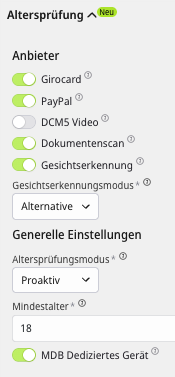
Now you can set the age restriction for your subjects:
- Go to the menu item General
- Change the setting Parental Control / Age Set
Disable the Set Age function for the entire machine & tray / For Entire Machine & For Entire Tray.
Activate age verification only via individual item number -
End the menu
XY Vending Machine with Android Touch
Information to follow...