SandenVendo with SVE01 board (USB port on board)
This setting applies to all SandenVendo machines with the SVE01 board, which can be found in devices with a mechanical keyboard. For example: SandenVendo G-Snack Standard, G-Snack Design, G-Snack Budget, G-Snack Evolution, Back-Loader, G-Drink Standard, G-Drink Design, B&C Standard, B&C Design
Check software version and update if necessary
Make sure that at least software version 2.60 is installed on the machine.
Here findest du die SVE01-Firmware (2.61).
Here you can find the latest SVE01 firmware (2.61).(Die Version 2.62 bietet Bug Fixes im Remote Vend Bereich).
Here you will find an explanatory video on how to perform the update.
2. Open the General Settings menu
3. Press the following buttons on the machine in sequence:
4 – 2 – 3 – 1 – 4
4. Passe die MDB-Artikelnummer an die Auswahlnummer an
Damit die MDB-Nummer in deiner Telemetrie mit der Auswahlnummer in deinem Automaten übereinstimmt, musst du im SandenVendo diese Einstellung vornehmen.
Wichtig ist diese Einstellung auch für Remote Vend.
5. Go to the payment settings
Set the following parameters:
Always Idle = 1
Fernverkauf = 1
Vorauswahlmodus = JA
if no prices are displayed at the machine:
Time limit exceeded in pre-selection mode = 40 seconds
wenn Preise am Automaten ausgezeichnet sind:
Zeitüberschreitung bei Vorauswahlmodus = 60 Sekunden
6. Menü beenden
Drücke die Taste 1 so lange, bis du vollständig aus dem Menü heraus bist.
7. Automat neu starten
Schalte den Automaten über den Hauptschalter aus und dann wieder ein.
Age Verification Settings
- Open the General Settings menu
- Press the following buttons on the machine in sequence:
4 – 2 – 3 – 1 – 4 - Navigate to the Time Age Query menu
Set the following parameters: - Enable age verification: Yes
- Start: 00:00
- End: 23:59
- Days of the week: All
The age verification is therefore active around the clock.
- Exit menu
Press the button 1 as many times as necessary until you are back in the General Settings menu. - Set age limit
Select the menu item Age limit
Enter the desired age limit there
(e.g. 18 for products for 18 years and older). - Enable age verification per product
Go to the main menu → G-Snack → Set age verification product
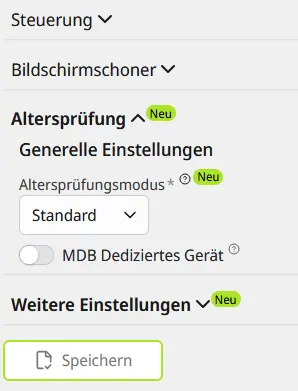
Then set the following settings in the Control Plane/CP and press Save:
Sanden Vendo Touch Devices
These settings apply to all SandenVendo machines with the EMA206 board that are installed in devices with a touch display.
For example: G-Snack Outdoor Touch, G-Snack Design Touch, G-Drink Outdoor Touch, G-Drink Design Touch, G-Frozen
1. Make sure that at least software version 003-017 is installed on the machine and perform an update if necessary.
Here you can find the latest Touch firmware for EMA 206:Download
Here you can find the latest Touch firmware for DMX8 18" Touch: Download
Lade die Firmware runter. Entpacke die ZIP Datei, sodass du nur die .7z-Datei vorhanden ist.
Ziehe die .7z-Dateien auf einen USB Stick.
Schalte den Automaten aus. Stecke den Stick in den USB-Port auf der Platine hinter dem Display und wähle dann den USB-Port der sich an der Außenseite befindet. Schalte den Automaten wieder an.
Drücke nun auf installieren.
2. Gehe in die Einstellungen deines Gerätes, indem du die rote Programmiertaste drückst.
3. Wähle Bezahlung und Preis aus
4. Wähle Zahlungssystem aus
5. Setze folgende Parameter:
- Always Idle = 1
- Remote Sale / Remote Vend = 1
- Pre-selection = yes
- Pre-selection timeout = 30 seconds
6. Exit menu
Press the button 1 as many times as necessary until you are back in the General Settings menu.
7. Restart machine
Brain
Information will follow ...
Sanden Vendo mit SF01 Platine (EPROM)
Information to follow ...