my.senvend telemetry
Your first login
How to log in to the my.senvend telemetry app for the first time – with the credentials you chose during onboarding. The login takes two steps: first your e-mail address, then your password.
Where you log in
You reach the telemetry app at my.senvend.com.
Which credentials
The e-mail address and password from your first registration on www.senvend.com – your onboarding credentials.
You can always log inYou can log in even without the telemetry package. Revenue and sales only appear in my.senvend once the telemetry package has been booked.
Step 1
Enter your e-mail
In the first step my.senvend only asks for your e-mail address – use exactly the one you registered with during onboarding.
Open the login page
Go to my.senvend.com. You land directly on the login.
Enter your e-mail address
In the E-Mail or username field, enter the address from your onboarding and confirm with Log in.
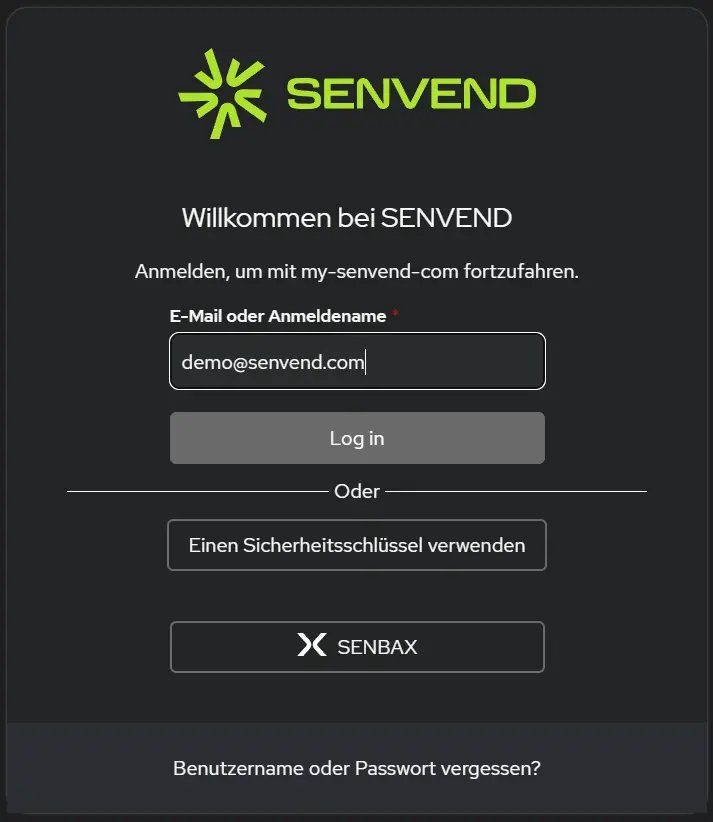
Use exactly the address from onboardingWith a different e-mail address there is no access to your company – not even if the address belongs to you.
Step 2
Passwort eingeben
If the e-mail address is correct, my.senvend asks in the second step for the password you chose during onboarding.
Enter your password
Enter the password from your onboarding. The eye icon in the field shows your input in plain text.
Confirm with Continue
A click on Continue takes you into the telemetry.
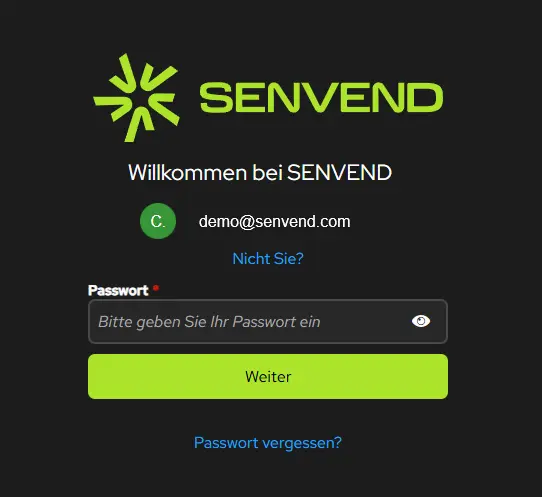
Picked the wrong address?Use Not you? below the displayed e-mail address to get back to the e-mail entry.
If you get stuck
Forgotten password
For forgotten credentials there is a link on both login steps – you do not need support for this.
On the e-mail page
At the bottom of the login page you find Forgot username or password?.
On the password page
Below the password field there is the link Forgot password?. Both ways start the reset.
You are in – what now?
Next, set up your telemetry: company data, products, location and machine – step by step.



my.senvend telemetry
Your first login
How to log in to the my.senvend telemetry app for the first time – with the credentials you chose during onboarding. The login takes two steps: first your e-mail address, then your password.
Where you log in
You reach the telemetry app at my.senvend.com.
Which credentials
The e-mail address and password from your first registration on www.senvend.com – your onboarding credentials.
You can always log inYou can log in even without the telemetry package. Revenue and sales only appear in my.senvend once the telemetry package has been booked.
Step 1
Enter your e-mail
In the first step my.senvend only asks for your e-mail address – use exactly the one you registered with during onboarding.
Open the login page
Go to my.senvend.com. You land directly on the login.
Enter your e-mail address
In the E-Mail or username field, enter the address from your onboarding and confirm with Log in.
Use exactly the address from onboardingWith a different e-mail address there is no access to your company – not even if the address belongs to you.
Step 2
Passwort eingeben
If the e-mail address is correct, my.senvend asks in the second step for the password you chose during onboarding.
Enter your password
Enter the password from your onboarding. The eye icon in the field shows your input in plain text.
Confirm with Continue
A click on Continue takes you into the telemetry.
Picked the wrong address?Use Not you? below the displayed e-mail address to get back to the e-mail entry.
If you get stuck
Forgotten password
For forgotten credentials there is a link on both login steps – you do not need support for this.
On the e-mail page
At the bottom of the login page you find Forgot username or password?.
On the password page
Below the password field there is the link Forgot password?. Both ways start the reset.
You are in – what now?
Next, set up your telemetry: company data, products, location and machine – step by step.