Vendon
Settings for your Vendon telemetry
How SENVEND talks to your machine depends on whether your Vendon box runs in slave or master mode. First find out which one is installed in your machine.
Identify
Which Vendon box version do I have?
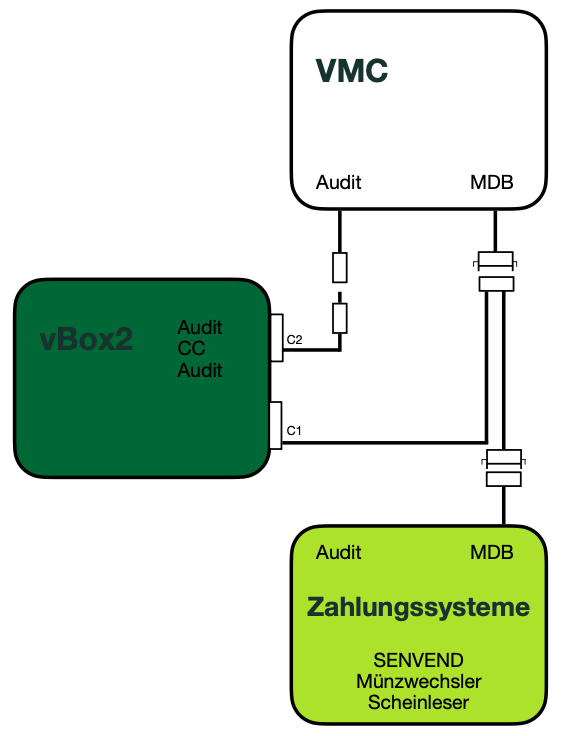
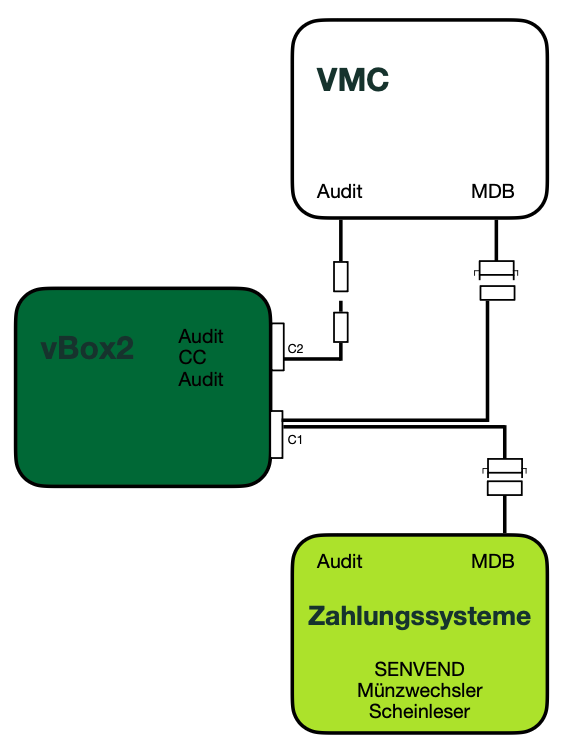
You can identify the Vendon box by the MDB connection cable at the C1 connector.
Vendon Master
At the C1 connector there are two MDB cables on the plug that goes into the Vendon box. The box sits actively between the machine and the payment systems and controls the data traffic.
Vendon Slave
At the C1 connector there is only one MDB cable on the plug that goes into the Vendon box. The box only reads along and does not interfere with the machine control.
Variant 1
Vendon SLAVE mode
SENVEND does not communicate with the Vendon box, but exclusively and directly with the machine.
How to recognise slave modeThe MDB slave cable has only one cable on the plug on the Vendon side.
For the telemetry and the terminal to work correctly, all machine settings have to be set properly. Make sure the matching device settings are activated in your machine.
Settings in my.senvend
Set MDB Dediziertes Gerät (MDB dedicated device) to AUS
In the SENVEND app my.senvend go to Automaten > Terminal > Altersprüfung > MDB Dediziertes Gerät and set it to AUS (off).
Set Bargeldzahlung (cash payment) to EIN
In the SENVEND app my.senvend go to Automaten > Terminal > Weitere Einstellungen > Bargeldzahlung and set it to EIN (on).
Variant 2
Vendon MASTER mode
SENVEND communicates only with the Vendon box – Vendon dictates everything – and no longer directly with the machine.
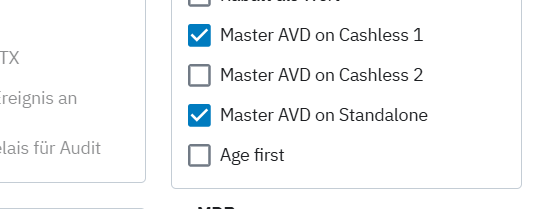
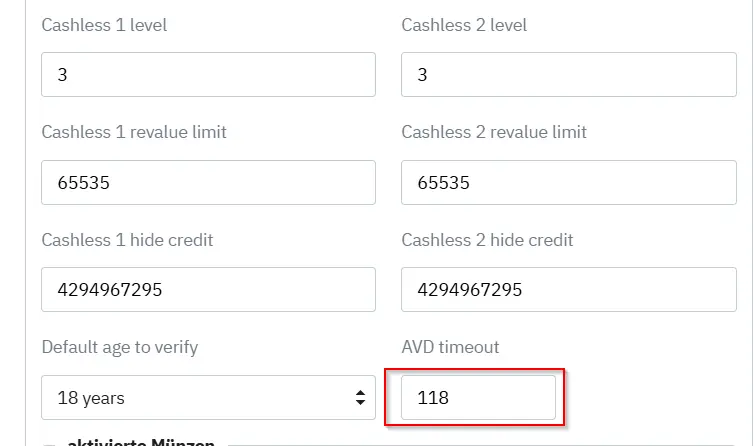
Deactivate age verification on the machineAge verification has to be completely deactivated on the machine because Vendon takes over the check. Set the age verification for the individual selections in Vendon instead.
How to recognise master modeThe MDB master cable has two cables on the plug on the Vendon side.
Activation via the specialist dealer
These settings are often not visible to end customers and cannot be changed by them. For activation please contact your specialist dealer or:
ChargeableService work by Vendon or by the partner may be chargeable.
Running SENVEND and DCM5 in parallel
Age verification can be run via SENVEND and DCM5 in parallel.
Settings in my.senvend
Set MDB Dediziertes Gerät (MDB dedicated device) to AUS
In the SENVEND app my.senvend go to Automaten > Terminal > Altersprüfung > MDB Dediziertes Gerät and set it to AUS (off).
Set Bargeldzahlung (cash payment) to EIN
In the SENVEND app my.senvend go to Automaten > Terminal > Weitere Einstellungen > Bargeldzahlung and set it to EIN (on).
Not sure which mode you are running?
Send us a photo of the C1 connector on the Vendon box – we will tell you whether master or slave is installed.

 +49 231 4499210
Vendon
Settings for your Vendon telemetry
How SENVEND talks to your machine depends on whether your Vendon box runs in slave or master mode. First find out which one is installed in your machine.
Identify
Which Vendon box version do I have?
You can identify the Vendon box by the MDB connection cable at the C1 connector.
Vendon Master
At the C1 connector there are two MDB cables on the plug that goes into the Vendon box. The box sits actively between the machine and the payment systems and controls the data traffic.
Vendon Slave
At the C1 connector there is only one MDB cable on the plug that goes into the Vendon box. The box only reads along and does not interfere with the machine control.
Variant 1
Vendon SLAVE mode
SENVEND does not communicate with the Vendon box, but exclusively and directly with the machine.
How to recognise slave modeThe MDB slave cable has only one cable on the plug on the Vendon side.
For the telemetry and the terminal to work correctly, all machine settings have to be set properly. Make sure the matching device settings are activated in your machine.
Settings in my.senvend
Set MDB Dediziertes Gerät (MDB dedicated device) to AUS
In the SENVEND app my.senvend go to Automaten > Terminal > Altersprüfung > MDB Dediziertes Gerät and set it to AUS (off).
Set Bargeldzahlung (cash payment) to EIN
In the SENVEND app my.senvend go to Automaten > Terminal > Weitere Einstellungen > Bargeldzahlung and set it to EIN (on).
Variant 2
Vendon MASTER mode
SENVEND communicates only with the Vendon box – Vendon dictates everything – and no longer directly with the machine.
Deactivate age verification on the machineAge verification has to be completely deactivated on the machine because Vendon takes over the check. Set the age verification for the individual selections in Vendon instead.
How to recognise master modeThe MDB master cable has two cables on the plug on the Vendon side.
Activation via the specialist dealer
These settings are often not visible to end customers and cannot be changed by them. For activation please contact your specialist dealer or:
ChargeableService work by Vendon or by the partner may be chargeable.
Running SENVEND and DCM5 in parallel
Age verification can be run via SENVEND and DCM5 in parallel.
Settings in my.senvend
Set MDB Dediziertes Gerät (MDB dedicated device) to AUS
In the SENVEND app my.senvend go to Automaten > Terminal > Altersprüfung > MDB Dediziertes Gerät and set it to AUS (off).
Set Bargeldzahlung (cash payment) to EIN
In the SENVEND app my.senvend go to Automaten > Terminal > Weitere Einstellungen > Bargeldzahlung and set it to EIN (on).
Not sure which mode you are running?
Send us a photo of the C1 connector on the Vendon box – we will tell you whether master or slave is installed.