Televend
Settings for your Televend telemetry
With Televend, communication runs via the Televend box. For SENVEND and age verification to work properly, the box and the settings in the Televend cloud have to be right.
How it works
Televend MASTER mode
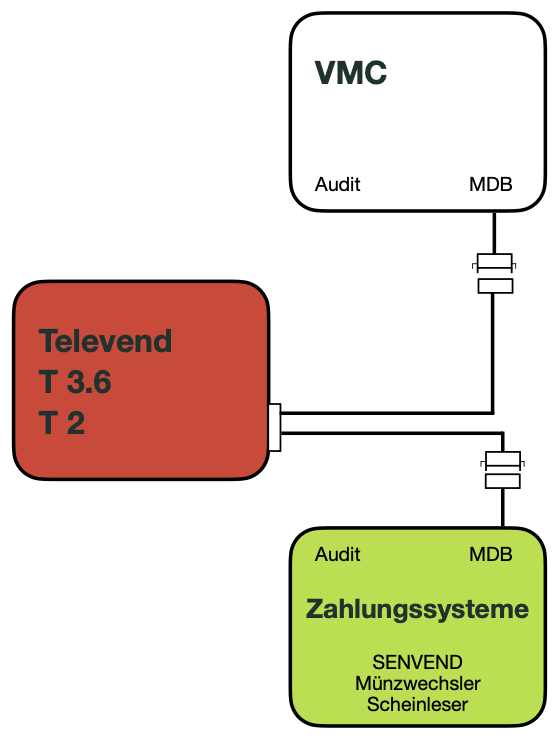
SENVEND communicates only with the Televend box – Televend dictates everything – and no longer directly with the machine.
Deactivate age verification on the machineAge verification has to be completely deactivated on the machine because Televend takes over the check. Set the age verification in Televend instead.
Activation via the specialist dealer
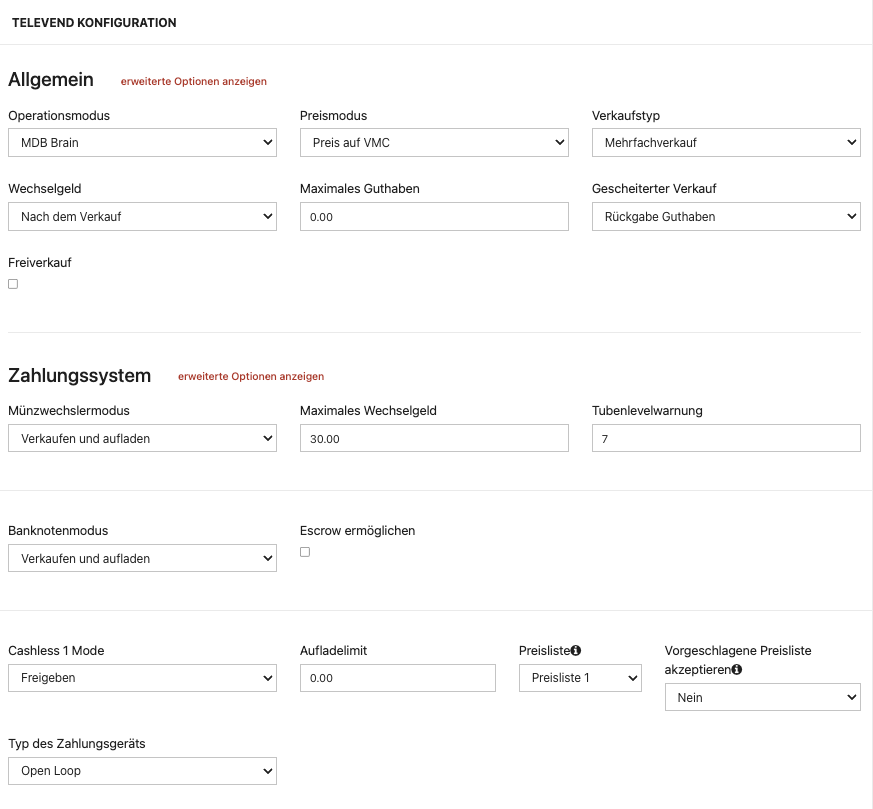
For master mode, special technical settings have to be made in the Televend box. These settings are often not visible to end customers and cannot be changed by them – please contact your specialist dealer for activation.
ChargeableThese service jobs may incur costs.
Requirement
Televend settings for SENVEND
For age verification via SENVEND to work, the Televend box has to run a sufficiently recent firmware.

Step by step
Software update of the Televend box
You install the update via the Televend cloud – there is nothing to do on the box itself.
Open the machine in the Televend cloud
Open your machine in the Televend cloud.
Open the overview
Go to Übersicht (overview).
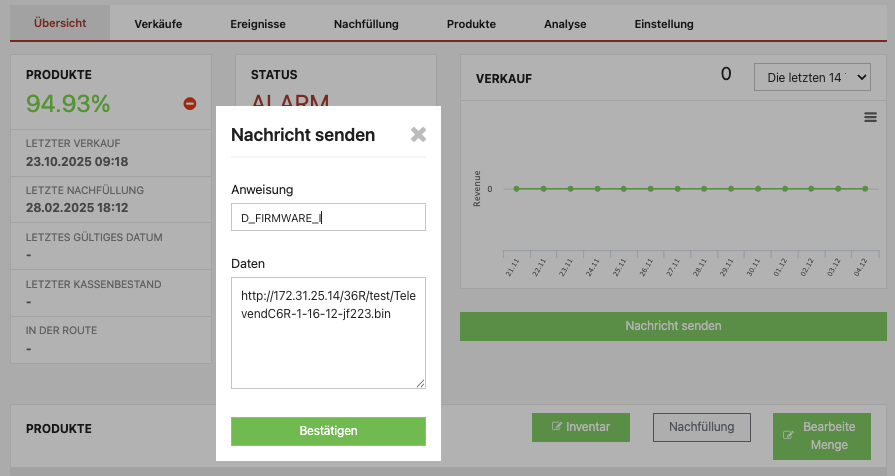
Send a message
Click the Nachricht senden (send message) button.
Enter the command
Enter the following:
Only via the Televend VPNThe download runs through the internal Televend VPN and only works for devices with an active SIM connection.
Confirm the message
Send the message by clicking Bestätigen (confirm).
Wait for the installation
Your Televend box starts flashing blue and orange and installs the new firmware.
Restart
The Televend box then restarts automatically.
Stuck with your Televend box?
Tell us which firmware your box is running – we will work out together what is going wrong.

 +49 231 4499210
Televend
Settings for your Televend telemetry
With Televend, communication runs via the Televend box. For SENVEND and age verification to work properly, the box and the settings in the Televend cloud have to be right.
How it works
Televend MASTER mode
SENVEND communicates only with the Televend box – Televend dictates everything – and no longer directly with the machine.
Deactivate age verification on the machineAge verification has to be completely deactivated on the machine because Televend takes over the check. Set the age verification in Televend instead.
Activation via the specialist dealer
For master mode, special technical settings have to be made in the Televend box. These settings are often not visible to end customers and cannot be changed by them – please contact your specialist dealer for activation.
ChargeableThese service jobs may incur costs.
Requirement
Televend settings for SENVEND
For age verification via SENVEND to work, the Televend box has to run a sufficiently recent firmware.
Step by step
Software update of the Televend box
You install the update via the Televend cloud – there is nothing to do on the box itself.
Open the machine in the Televend cloud
Open your machine in the Televend cloud.
Open the overview
Go to Übersicht (overview).
Send a message
Click the Nachricht senden (send message) button.
Enter the command
Enter the following:
Only via the Televend VPNThe download runs through the internal Televend VPN and only works for devices with an active SIM connection.
Confirm the message
Send the message by clicking Bestätigen (confirm).
Wait for the installation
Your Televend box starts flashing blue and orange and installs the new firmware.
Restart
The Televend box then restarts automatically.
Stuck with your Televend box?
Tell us which firmware your box is running – we will work out together what is going wrong.