GPE Touch
These settings apply to all GPE machines with a touch display.
- Check the software version and update if necessary.
Make sure that at least software version XXX is installed on the machine. -
Open the menu
- Payment config
Open the menu item -
Set the following parameters:
-
Always Idle = ON
-
Always Idle = ON
-
Exit the menu
-
Restart the machine
Switch the machine off using the main switch and then on again.
Age Verification Settings
Currently only partially compatible with SENVEND!
Age verification can be done via my.SENVEND.com will be discontinued if no cash systems are used.
my.SENVEND.com Settings
Here you can see the optimal settings in my.SENVEND.com:
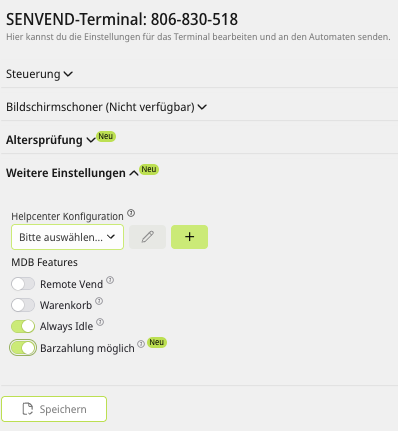
GPE with selection keypad
These settings apply to all GPE machines that have a keypad and a blue display and do not have DIP switches on the circuit board.
- Check the software version and update if necessary.
Make sure your vending machine has a blue display. -
Open the menu
- Payment config
Open the menu item -
Set the following parameters:
-
Always Idle = ON
-
Always Idle = ON
-
Exit the menu
-
Restart the machine
Switch the machine off using the main switch and then on again.
Age Verification Settings
Currently only partially compatible with SENVEND!
Age verification can be done via my.SENVEND.com ewill be discontinued if no cash systems are used.
my.SENVEND.com Settings
Here you can see the optimal settings in my.SENVEND.com: