Onboarding
Onboarding for sole proprietorships
You have bought a SENVEND payment terminal and are now filling in your onboarding? Here you will find everything you need to know as a sole proprietorship: which legal form to select, which documents you need and how to fill in every field of the form correctly.
1. Details
Company data, legal form, trade licence and beneficial owners.
2. Payment details
SEPA direct debit mandate with IBAN, BIC and bank.
3. Terminal locations
The place where your terminal is installed – including the number of terminals.
Start your onboardingYou start your onboarding at www.senvend.com/onboarding. The form then guides you step by step through all the details.
What is a sole proprietorship?
The sole proprietorship is the simplest business form in Germany: a single person runs the business – without co-partners, without minimum capital and without a separate legal entity. You and your business are legally the same person.
One person
You are the sole owner. There are no co-partners and no partnership agreement.
No minimum capital
Unlike a UG or GmbH, you do not have to pay in any share capital.
You are personally liable
You are personally liable for the business – including with your private assets.
You are a sole proprietorship even if …
- you have registered a small trade business (Kleingewerbe).
- you are a small business owner under Section 19 UStG and do not charge VAT.
- you are registered alone in the commercial register as a registered merchant (e.K.).
- your business runs as a side business.
Small business owner is not a legal formThe small business regulation is only a tax classification. In the onboarding you still select “Einzelunternehmen” (sole proprietorship) – just like a Kleingewerbe.
Documents you need
Get everything together before you start. Then you will be done in a few minutes.
Trade licence
Your business registration as a PDF. You upload it directly in the form.
VAT identification number
Your VAT ID. If you do not have one yet, you can apply for it online.
Creditor identification number
You get the creditor ID from the Deutsche Bundesbank – by email within a few minutes.
ID document
From every beneficial owner. As a sole proprietorship that is only you.
Bank details
IBAN, BIC and the name of your bank for the SEPA direct debit mandate.
Location data
Address and phone number of every terminal location as well as the number of terminals.
Step 1
Filling in the details
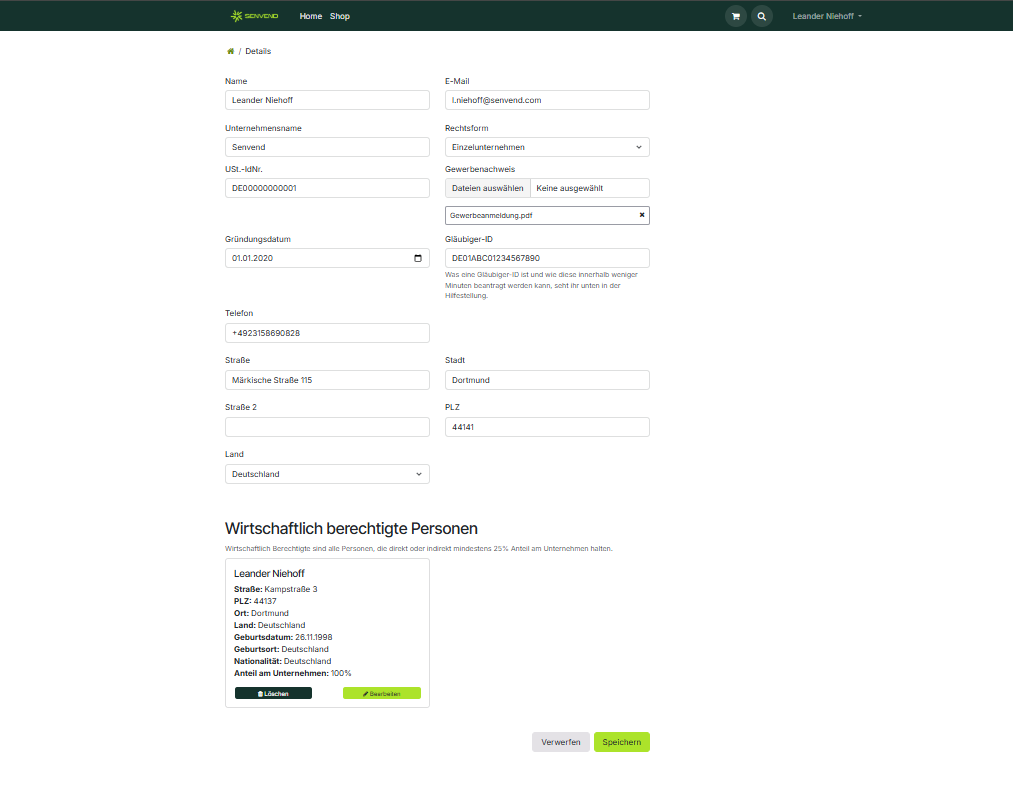
On the first page you enter your company data. This is what the completed page looks like:
The fields in detail
Applying for the creditor ID and VAT ID
Creditor ID
The creditor identification number is needed to collect money from your customers – this is necessary to process girocard payments. You apply for it at the Deutsche Bundesbank and receive it directly by email.
VAT identification number
If you do not have a VAT ID yet, you can apply for it online. Also with a Kleingewerbe: the number does not oblige you to pay VAT. It is only issued for possible future VAT payments.
Beneficial owners
Beneficial owners are all persons who directly or indirectly hold at least 25 % of the company. In a sole proprietorship the owner must be entered with 100 %.
Yes, as a sole proprietor tooYou have to enter yourself as a beneficial owner with 100 % – even if there is nobody else in the company. Without this entry we cannot complete the onboarding.
What you enter per person
ID documentsFor a successful onboarding we need the ID documents of all beneficial owners – not just one of them.
Step 2
Payment details and SEPA direct debit
In the second step you set up your SEPA direct debit mandate. We use it to debit the costs for payment processing and our SENVEND services.
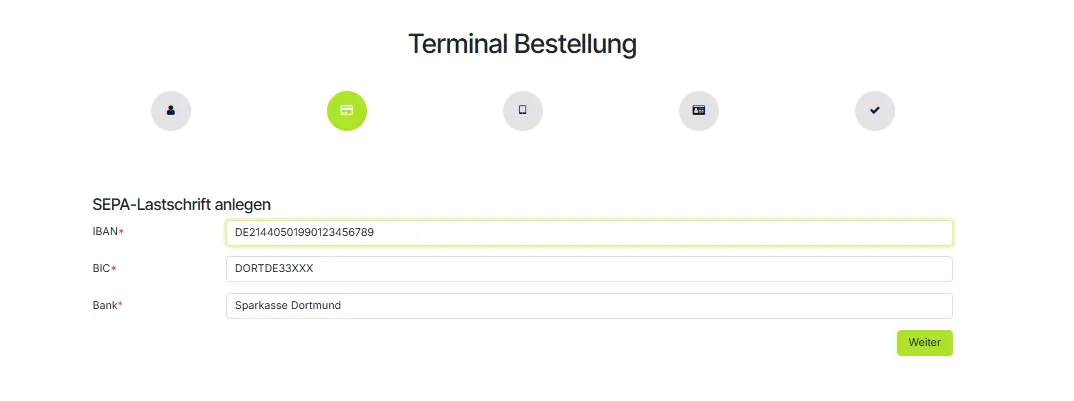
SEPA direct debit onlyThe costs for payment processing and the SENVEND services are always debited by SEPA direct debit mandate. Unfortunately we cannot offer any other payment method.
Step 3
Creating terminal locations
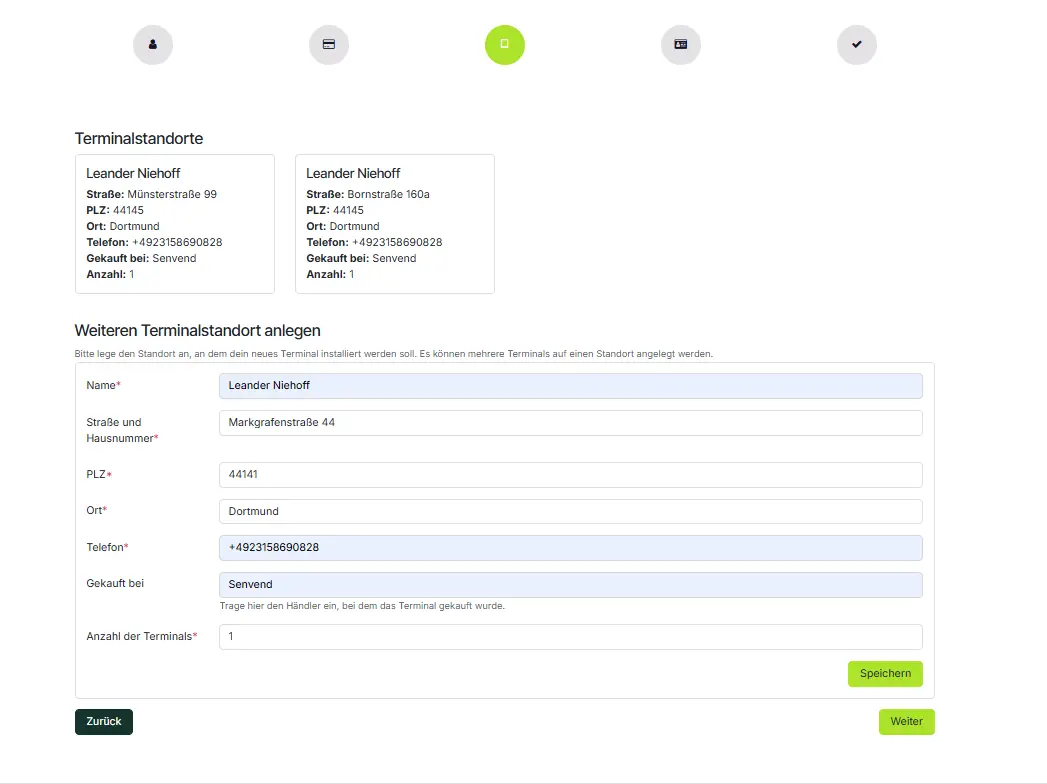
The terminal location is the place where your terminal is installed. Several terminals can be added to one location.
The fields in detail
- You do not have to add every location separately – you can also register all terminals at your headquarters.
- If you want to keep the locations separate, you add a separate terminal location for every single location.
- After submitting the form you can add further locations.
Frequently asked questions
What is a creditor ID and how do I get one?
The creditor identification number is needed to collect money from your customers, this is necessary to process girocard payments. You can apply for the creditor ID at the Deutsche Bundesbank and receive it directly by email.
What is a beneficial owner?
Beneficial owners are all persons who directly or indirectly hold at least 25% of the company. In a sole proprietorship the owner must be entered with 100%.
I am a sole proprietor. Do I also have to enter beneficial owners?
Yes, you have to enter yourself with 100%.
I do not have a VAT identification number. What can I do?
You can apply for your VAT identification number online. You can find the form here.
I have a Kleingewerbe. Can I still apply for a VAT identification number?
Yes, you can apply for the number. The number does not oblige you to pay VAT, it is applied for in view of possible future VAT payments. You can find the form here.
Is the ID document of one beneficial owner enough?
No, for a successful onboarding we need the ID documents of all beneficial owners.
What is the SEPA direct debit mandate needed for?
We use the SEPA direct debit mandate to debit the costs for payment processing and our SENVEND services.
Can I also pay with another payment method?
The costs for payment processing and the SENVEND services are always debited by SEPA direct debit mandate. Unfortunately we cannot provide any other payment method.
Do I have to add all locations?
No, you can also register all terminals at your headquarters.
What if I have several locations?
You have to add a terminal location for every single location. After submitting the form you can add further locations.
What does number of terminals mean?
The number includes the terminals located at the specified location.
Any questions about the onboarding?
Our contracts team is available exclusively by email and will help you with any questions about your onboarding.
Onboarding
Onboarding for sole proprietorships
You have bought a SENVEND payment terminal and are now filling in your onboarding? Here you will find everything you need to know as a sole proprietorship: which legal form to select, which documents you need and how to fill in every field of the form correctly.
1. Details
Company data, legal form, trade licence and beneficial owners.
2. Payment details
SEPA direct debit mandate with IBAN, BIC and bank.
3. Terminal locations
The place where your terminal is installed – including the number of terminals.
Start your onboardingYou start your onboarding at www.senvend.com/onboarding. The form then guides you step by step through all the details.
What is a sole proprietorship?
The sole proprietorship is the simplest business form in Germany: a single person runs the business – without co-partners, without minimum capital and without a separate legal entity. You and your business are legally the same person.
One person
You are the sole owner. There are no co-partners and no partnership agreement.
No minimum capital
Unlike a UG or GmbH, you do not have to pay in any share capital.
You are personally liable
You are personally liable for the business – including with your private assets.
You are a sole proprietorship even if …
- you have registered a small trade business (Kleingewerbe).
- you are a small business owner under Section 19 UStG and do not charge VAT.
- you are registered alone in the commercial register as a registered merchant (e.K.).
- your business runs as a side business.
Small business owner is not a legal formThe small business regulation is only a tax classification. In the onboarding you still select “Einzelunternehmen” (sole proprietorship) – just like a Kleingewerbe.
Documents you need
Get everything together before you start. Then you will be done in a few minutes.
Trade licence
Your business registration as a PDF. You upload it directly in the form.
VAT identification number
Your VAT ID. If you do not have one yet, you can apply for it online.
Creditor identification number
You get the creditor ID from the Deutsche Bundesbank – by email within a few minutes.
ID document
From every beneficial owner. As a sole proprietorship that is only you.
Bank details
IBAN, BIC and the name of your bank for the SEPA direct debit mandate.
Location data
Address and phone number of every terminal location as well as the number of terminals.
Step 1
Filling in the details
On the first page you enter your company data. This is what the completed page looks like:
The fields in detail
Applying for the creditor ID and VAT ID
Creditor ID
The creditor identification number is needed to collect money from your customers – this is necessary to process girocard payments. You apply for it at the Deutsche Bundesbank and receive it directly by email.
VAT identification number
If you do not have a VAT ID yet, you can apply for it online. Also with a Kleingewerbe: the number does not oblige you to pay VAT. It is only issued for possible future VAT payments.
Beneficial owners
Beneficial owners are all persons who directly or indirectly hold at least 25 % of the company. In a sole proprietorship the owner must be entered with 100 %.
Yes, as a sole proprietor tooYou have to enter yourself as a beneficial owner with 100 % – even if there is nobody else in the company. Without this entry we cannot complete the onboarding.
What you enter per person
ID documentsFor a successful onboarding we need the ID documents of all beneficial owners – not just one of them.
Step 2
Payment details and SEPA direct debit
In the second step you set up your SEPA direct debit mandate. We use it to debit the costs for payment processing and our SENVEND services.
SEPA direct debit onlyThe costs for payment processing and the SENVEND services are always debited by SEPA direct debit mandate. Unfortunately we cannot offer any other payment method.
Step 3
Creating terminal locations
The terminal location is the place where your terminal is installed. Several terminals can be added to one location.
The fields in detail
- You do not have to add every location separately – you can also register all terminals at your headquarters.
- If you want to keep the locations separate, you add a separate terminal location for every single location.
- After submitting the form you can add further locations.
Frequently asked questions
What is a creditor ID and how do I get one?
The creditor identification number is needed to collect money from your customers, this is necessary to process girocard payments. You can apply for the creditor ID at the Deutsche Bundesbank and receive it directly by email.
What is a beneficial owner?
Beneficial owners are all persons who directly or indirectly hold at least 25% of the company. In a sole proprietorship the owner must be entered with 100%.
I am a sole proprietor. Do I also have to enter beneficial owners?
Yes, you have to enter yourself with 100%.
I do not have a VAT identification number. What can I do?
You can apply for your VAT identification number online. You can find the form here.
I have a Kleingewerbe. Can I still apply for a VAT identification number?
Yes, you can apply for the number. The number does not oblige you to pay VAT, it is applied for in view of possible future VAT payments. You can find the form here.
Is the ID document of one beneficial owner enough?
No, for a successful onboarding we need the ID documents of all beneficial owners.
What is the SEPA direct debit mandate needed for?
We use the SEPA direct debit mandate to debit the costs for payment processing and our SENVEND services.
Can I also pay with another payment method?
The costs for payment processing and the SENVEND services are always debited by SEPA direct debit mandate. Unfortunately we cannot provide any other payment method.
Do I have to add all locations?
No, you can also register all terminals at your headquarters.
What if I have several locations?
You have to add a terminal location for every single location. After submitting the form you can add further locations.
What does number of terminals mean?
The number includes the terminals located at the specified location.
Any questions about the onboarding?
Our contracts team is available exclusively by email and will help you with any questions about your onboarding.