Sielaff
Einstellungen für Sielaff Automaten
Welche Einstellungen du brauchst, hängt von der Baureihe deines Sielaff-Automaten ab. Wähle zuerst deine Baureihe – darunter stehen die passenden Schritte.
Zwei MenüweltenDie SiLine-Baureihe wird über das Touch-Menü eingestellt, alle anderen Baureihen über das M7-Menü. Wenn du unsicher bist, welches Menü dein Automat hat, hilft dir unser Support weiter.
Software-UpdatesFür Software-Updates an deinen Automaten wende dich bitte an deinen Fachhandelspartner. Einige Automaten brauchen für das Update spezielle Soft- und Hardware – die Sielaff RED Box.
Baureihe 1
Sielaff SiLine
Diese Einstellungen gelten für alle Modelle der SiLine-Baureihe. Die Bedienung läuft über das Menü Automatenkonfiguration.
Software-VersionDie aktuell laufende SiLine-Software-Version ist 0.23.5.
Für diese GeräteSiLine HG TS27, SiLine HG TS27 Trend, SiLine HG TS7, SiLine HG TS7 Trend, SiLine GF M, SiLine GF L, SiLine GF Public, SiLine GF L RO, SiLine Snack und Combi S, SiLine Snack und Combi M, LM-Ausführung, 2T-Ausführung, SiLine Snack und Combi Public und SiLine Snack und Combi M RO.
Menü Automatenkonfiguration öffnen
Öffne am Automaten das Menü Automatenkonfiguration.
Menü Bezahlsysteme öffnen
Öffne dort das Menü Bezahlsysteme.
Parameter unter Cashless setzen
Setze unter Cashless die folgenden Parameter:
Speichern und Menü verlassen
Speichere die Einstellungen und verlasse das Menü.
Automat neu starten
Schalte den Automaten über den Hauptschalter aus und nach 5 Sekunden wieder ein.
Altersverifikation einstellen
Gilt für alle SiLine-Modelle außer HG TS27, HG TS27 Trend, HG TS7 und HG TS7 Trend – diese vier Geräte haben keine Altersverifikation.
Menü Automatenkonfiguration öffnen
Öffne am Automaten das Menü Automatenkonfiguration.
Menü Produkte öffnen
Öffne dort das Menü Produkte.
Spiralen auswählen
Wähle die Spiralen aus, welche altersgeschützt sein sollen, und drücke auf Weiter.
Jugendschutz aktivieren
Navigiere zu Aktivierungszeiten und aktiviere den gewünschten Jugendschutz (1 oder 2).
Speichern und Menü verlassen
Speichere die Einstellungen und verlasse das Menü.
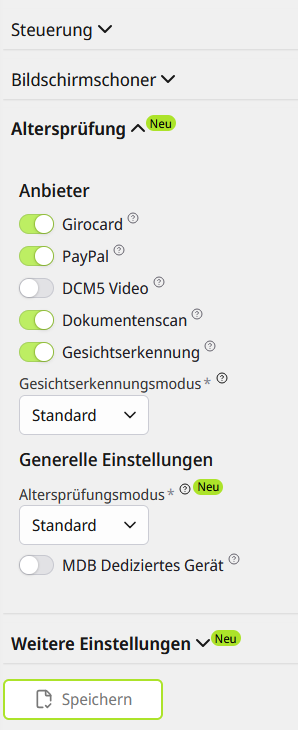
Stelle danach die folgenden Einstellungen in der SENVEND APP my.senvend ein und drücke auf Speichern:
Warenkorb einrichten
Warenkorb aktivieren
Öffne das Menü Automatenkonfiguration, dann das Menü Allgemein, und aktiviere den Warenkorb.
Speichern und Menü verlassen
Speichere die Einstellungen und verlasse das Menü.
MDB 4.3 aktivieren
Öffne das Menü Bezahlsysteme, dann das Menü Cashless, und aktiviere MDB 4.3 „Basket/partial refund/options price“.
Speichern und Menü verlassen
Speichere die Einstellungen und verlasse das Menü.
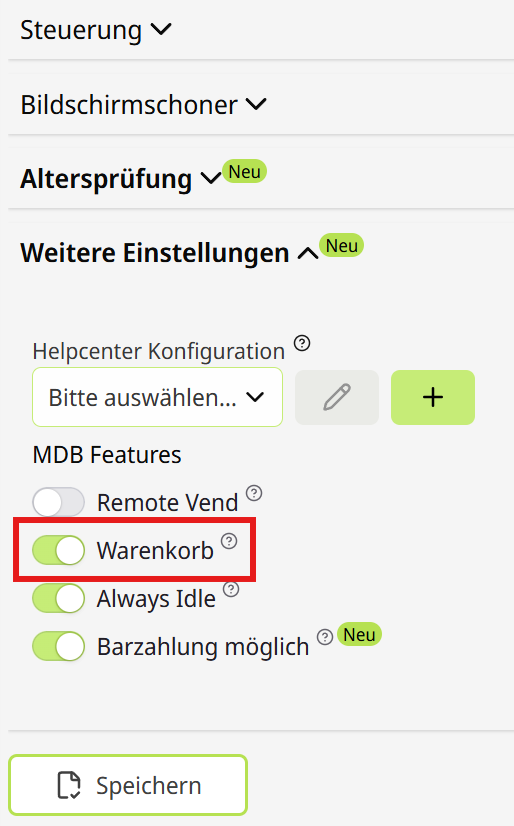
Stelle danach die folgenden Einstellungen in der SENVEND APP my.senvend ein und drücke auf Speichern:
Baureihe 2
SiOne / SiLoop
Für diese Geräte stellen wir die Einstellungen gerade zusammen.
Für diese GeräteSiLine SiOne S, SiLine SiOne M und SiLine SiLoop CO2.
Einstellungen folgenDie Einstellungen für diese Baureihe stellen wir gerade zusammen. Bis dahin hilft dir unser Support direkt weiter: help@senvend.com oder +49 231 4499210.
Baureihe 3
SN48
Diese Einstellungen gelten für Sielaff SN48 Automaten. Die Bedienung läuft über das Menü M7 Installation.
Menü M7 Installation öffnen
Öffne am Automaten das Menü M7 Installation.
Menü Kreditsystem einstellen
Öffne das Menü Kreditsystem und stelle folgende Parameter ein:
Menü Kreditsystem verlassen
Verlasse das Menü Kreditsystem.
Menü Kartensystem einstellen
Öffne das Menü Kartensystem und stelle folgende Parameter ein:
Menü verlassen
Speichere die Einstellungen und verlasse das Menü.
Automat neu starten
Schalte den Automaten über den Hauptschalter aus und nach 5 Sekunden wieder ein.
Altersverifikation einstellen
Menü M7 Installation öffnen
Öffne am Automaten das Menü M7 Installation.
Jugendschutz aktivieren
Öffne das Menü Automat und stelle folgenden Parameter ein:
Menü verlassen
Verlasse das Menü.
Altersgrenze einstellen
Wähle das Menü M1 Preise/Zuordnung und trage dort die gewünschte Altersgrenze für die Spiralen ein, zum Beispiel 18 für Produkte ab 18 Jahren.
Baureihe 4
Robimat X-Serie
Diese Einstellungen gelten für die Robimat X-Serie und sind identisch mit denen des SN48. Die Bedienung läuft über das Menü M7 Installation.
Für diese GeräteRobimat XS, Robimat XM, Robimat XL, Robimat High Security und Robimat X-Serie Outdoor.
Menü M7 Installation öffnen
Öffne am Automaten das Menü M7 Installation.
Menü Kreditsystem einstellen
Öffne das Menü Kreditsystem und stelle folgende Parameter ein:
Menü Kreditsystem verlassen
Verlasse das Menü Kreditsystem.
Menü Kartensystem einstellen
Öffne das Menü Kartensystem und stelle folgende Parameter ein:
Menü verlassen
Verlasse das Menü.
Automat neu starten
Schalte den Automaten über den Hauptschalter aus und nach 5 Sekunden wieder ein.
Altersverifikation einstellen
Menü M7 Installation öffnen
Öffne am Automaten das Menü M7 Installation.
Jugendschutz aktivieren
Öffne das Menü Automat und stelle folgenden Parameter ein:
Menü verlassen
Verlasse das Menü.
Altersgrenze einstellen
Wähle das Menü M1 Preise/Zuordnung und trage dort die gewünschte Altersgrenze für die Spiralen ein, zum Beispiel 18 für Produkte ab 18 Jahren.
Baureihe 5
FK-Serie
Diese Einstellungen gelten für die FK-Serie und sind identisch mit denen des SN48. Die Bedienung läuft über das Menü M7 Installation.
Für diese GeräteFK 185, FK 230, FK 320 und FK High Security.
Menü M7 Installation öffnen
Öffne am Automaten das Menü M7 Installation.
Menü Kreditsystem einstellen
Öffne das Menü Kreditsystem und stelle folgende Parameter ein:
Menü Kreditsystem verlassen
Verlasse das Menü Kreditsystem.
Menü Kartensystem einstellen
Öffne das Menü Kartensystem und stelle folgende Parameter ein:
Menü verlassen
Verlasse das Menü.
Automat neu starten
Schalte den Automaten über den Hauptschalter aus und nach 5 Sekunden wieder ein.
Altersverifikation einstellen
Menü M7 Installation öffnen
Öffne am Automaten das Menü M7 Installation.
Jugendschutz aktivieren
Öffne das Menü Automat und stelle folgenden Parameter ein:
Menü verlassen
Verlasse das Menü.
Altersgrenze einstellen
Wähle das Menü M1 Preise/Zuordnung und trage dort die gewünschte Altersgrenze für die Spiralen ein, zum Beispiel 18 für Produkte ab 18 Jahren.
Baureihe 6
HG-Serie
Diese Einstellungen gelten für die Sielaff HG-Serie – Kaffeemaschinen ohne Altersverifikation. Die Bedienung läuft über das Menü M7 Installation.
Für diese GeräteCVS, CIS, HG High Security und SiVend HG Outdoor.
Menü M7 Installation öffnen
Öffne am Automaten das Menü M7 Installation.
Menü Kreditsystem einstellen
Öffne das Menü Kreditsystem und stelle folgende Parameter ein:
Menü Kreditsystem verlassen
Verlasse das Menü Kreditsystem.
Menü Kartensystem einstellen
Öffne das Menü Kartensystem und stelle folgende Parameter ein:
Menü verlassen
Verlasse das Menü.
Automat neu starten
Schalte den Automaten über den Hauptschalter aus und dann wieder ein.
Baureihe 7
SÜ / FS
Diese Einstellungen gelten für Sielaff SÜ 1500 und FS 1500 Automaten und sind identisch mit denen des SN48. Die Bedienung läuft über das Menü M7 Installation.
Abhängig von Software-Version und PlatineWelche Einstellungen bei diesem Automaten greifen, hängt von der Software-Version und der verbauten VMC-Platine ab. Die hier beschriebenen Schritte gelten für die neuere M32-Platine. Ältere Platinen haben kein Always Idle – auch wenn der Punkt im Menü auftaucht – und dort funktioniert nur die proaktive Altersverifikation.
Menü M7 Installation öffnen
Öffne am Automaten das Menü M7 Installation.
Menü Kreditsystem einstellen
Öffne das Menü Kreditsystem und stelle folgende Parameter ein:
Menü Kreditsystem verlassen
Verlasse das Menü Kreditsystem.
Menü Kartensystem einstellen
Öffne das Menü Kartensystem und stelle folgende Parameter ein:
Menü verlassen
Verlasse das Menü.
Automat neu starten
Schalte den Automaten über den Hauptschalter aus und dann wieder ein.
Altersverifikation einstellen
Menü M7 Installation öffnen
Öffne am Automaten das Menü M7 Installation.
Jugendschutz aktivieren
Öffne das Menü Automat und stelle folgenden Parameter ein:
Menü verlassen
Verlasse das Menü.
Altersgrenze einstellen
Wähle das Menü M1 Preise/Zuordnung und trage dort die gewünschte Altersgrenze für die Spiralen ein, zum Beispiel 18 für Produkte ab 18 Jahren.
Unsicher, welches Modell du hast?
Schick uns ein Foto des Typenschilds oder des Displays – wir sagen dir, welche Einstellungen für deinen Automaten gelten.



Sielaff
Einstellungen für Sielaff Automaten
Welche Einstellungen du brauchst, hängt von der Baureihe deines Sielaff-Automaten ab. Wähle zuerst deine Baureihe – darunter stehen die passenden Schritte.
Zwei MenüweltenDie SiLine-Baureihe wird über das Touch-Menü eingestellt, alle anderen Baureihen über das M7-Menü. Wenn du unsicher bist, welches Menü dein Automat hat, hilft dir unser Support weiter.
Software-UpdatesFür Software-Updates an deinen Automaten wende dich bitte an deinen Fachhandelspartner. Einige Automaten brauchen für das Update spezielle Soft- und Hardware – die Sielaff RED Box.
Baureihe 1
Sielaff SiLine
Diese Einstellungen gelten für alle Modelle der SiLine-Baureihe. Die Bedienung läuft über das Menü Automatenkonfiguration.
Software-VersionDie aktuell laufende SiLine-Software-Version ist 0.23.5.
Für diese GeräteSiLine HG TS27, SiLine HG TS27 Trend, SiLine HG TS7, SiLine HG TS7 Trend, SiLine GF M, SiLine GF L, SiLine GF Public, SiLine GF L RO, SiLine Snack und Combi S, SiLine Snack und Combi M, LM-Ausführung, 2T-Ausführung, SiLine Snack und Combi Public und SiLine Snack und Combi M RO.
Menü Automatenkonfiguration öffnen
Öffne am Automaten das Menü Automatenkonfiguration.
Menü Bezahlsysteme öffnen
Öffne dort das Menü Bezahlsysteme.
Parameter unter Cashless setzen
Setze unter Cashless die folgenden Parameter:
Speichern und Menü verlassen
Speichere die Einstellungen und verlasse das Menü.
Automat neu starten
Schalte den Automaten über den Hauptschalter aus und nach 5 Sekunden wieder ein.
Altersverifikation einstellen
Gilt für alle SiLine-Modelle außer HG TS27, HG TS27 Trend, HG TS7 und HG TS7 Trend – diese vier Geräte haben keine Altersverifikation.
Menü Automatenkonfiguration öffnen
Öffne am Automaten das Menü Automatenkonfiguration.
Menü Produkte öffnen
Öffne dort das Menü Produkte.
Spiralen auswählen
Wähle die Spiralen aus, welche altersgeschützt sein sollen, und drücke auf Weiter.
Jugendschutz aktivieren
Navigiere zu Aktivierungszeiten und aktiviere den gewünschten Jugendschutz (1 oder 2).
Speichern und Menü verlassen
Speichere die Einstellungen und verlasse das Menü.
Stelle danach die folgenden Einstellungen in der SENVEND APP my.senvend ein und drücke auf Speichern:
Warenkorb einrichten
Warenkorb aktivieren
Öffne das Menü Automatenkonfiguration, dann das Menü Allgemein, und aktiviere den Warenkorb.
Speichern und Menü verlassen
Speichere die Einstellungen und verlasse das Menü.
MDB 4.3 aktivieren
Öffne das Menü Bezahlsysteme, dann das Menü Cashless, und aktiviere MDB 4.3 „Basket/partial refund/options price“.
Speichern und Menü verlassen
Speichere die Einstellungen und verlasse das Menü.
Stelle danach die folgenden Einstellungen in der SENVEND APP my.senvend ein und drücke auf Speichern:
Baureihe 2
SiOne / SiLoop
Für diese Geräte stellen wir die Einstellungen gerade zusammen.
Für diese GeräteSiLine SiOne S, SiLine SiOne M und SiLine SiLoop CO2.
Einstellungen folgenDie Einstellungen für diese Baureihe stellen wir gerade zusammen. Bis dahin hilft dir unser Support direkt weiter: help@senvend.com oder +49 231 4499210.
Baureihe 3
SN48
Diese Einstellungen gelten für Sielaff SN48 Automaten. Die Bedienung läuft über das Menü M7 Installation.
Menü M7 Installation öffnen
Öffne am Automaten das Menü M7 Installation.
Menü Kreditsystem einstellen
Öffne das Menü Kreditsystem und stelle folgende Parameter ein:
Menü Kreditsystem verlassen
Verlasse das Menü Kreditsystem.
Menü Kartensystem einstellen
Öffne das Menü Kartensystem und stelle folgende Parameter ein:
Menü verlassen
Speichere die Einstellungen und verlasse das Menü.
Automat neu starten
Schalte den Automaten über den Hauptschalter aus und nach 5 Sekunden wieder ein.
Altersverifikation einstellen
Menü M7 Installation öffnen
Öffne am Automaten das Menü M7 Installation.
Jugendschutz aktivieren
Öffne das Menü Automat und stelle folgenden Parameter ein:
Menü verlassen
Verlasse das Menü.
Altersgrenze einstellen
Wähle das Menü M1 Preise/Zuordnung und trage dort die gewünschte Altersgrenze für die Spiralen ein, zum Beispiel 18 für Produkte ab 18 Jahren.
Baureihe 4
Robimat X-Serie
Diese Einstellungen gelten für die Robimat X-Serie und sind identisch mit denen des SN48. Die Bedienung läuft über das Menü M7 Installation.
Für diese GeräteRobimat XS, Robimat XM, Robimat XL, Robimat High Security und Robimat X-Serie Outdoor.
Menü M7 Installation öffnen
Öffne am Automaten das Menü M7 Installation.
Menü Kreditsystem einstellen
Öffne das Menü Kreditsystem und stelle folgende Parameter ein:
Menü Kreditsystem verlassen
Verlasse das Menü Kreditsystem.
Menü Kartensystem einstellen
Öffne das Menü Kartensystem und stelle folgende Parameter ein:
Menü verlassen
Verlasse das Menü.
Automat neu starten
Schalte den Automaten über den Hauptschalter aus und nach 5 Sekunden wieder ein.
Altersverifikation einstellen
Menü M7 Installation öffnen
Öffne am Automaten das Menü M7 Installation.
Jugendschutz aktivieren
Öffne das Menü Automat und stelle folgenden Parameter ein:
Menü verlassen
Verlasse das Menü.
Altersgrenze einstellen
Wähle das Menü M1 Preise/Zuordnung und trage dort die gewünschte Altersgrenze für die Spiralen ein, zum Beispiel 18 für Produkte ab 18 Jahren.
Baureihe 5
FK-Serie
Diese Einstellungen gelten für die FK-Serie und sind identisch mit denen des SN48. Die Bedienung läuft über das Menü M7 Installation.
Für diese GeräteFK 185, FK 230, FK 320 und FK High Security.
Menü M7 Installation öffnen
Öffne am Automaten das Menü M7 Installation.
Menü Kreditsystem einstellen
Öffne das Menü Kreditsystem und stelle folgende Parameter ein:
Menü Kreditsystem verlassen
Verlasse das Menü Kreditsystem.
Menü Kartensystem einstellen
Öffne das Menü Kartensystem und stelle folgende Parameter ein:
Menü verlassen
Verlasse das Menü.
Automat neu starten
Schalte den Automaten über den Hauptschalter aus und nach 5 Sekunden wieder ein.
Altersverifikation einstellen
Menü M7 Installation öffnen
Öffne am Automaten das Menü M7 Installation.
Jugendschutz aktivieren
Öffne das Menü Automat und stelle folgenden Parameter ein:
Menü verlassen
Verlasse das Menü.
Altersgrenze einstellen
Wähle das Menü M1 Preise/Zuordnung und trage dort die gewünschte Altersgrenze für die Spiralen ein, zum Beispiel 18 für Produkte ab 18 Jahren.
Baureihe 6
HG-Serie
Diese Einstellungen gelten für die Sielaff HG-Serie – Kaffeemaschinen ohne Altersverifikation. Die Bedienung läuft über das Menü M7 Installation.
Für diese GeräteCVS, CIS, HG High Security und SiVend HG Outdoor.
Menü M7 Installation öffnen
Öffne am Automaten das Menü M7 Installation.
Menü Kreditsystem einstellen
Öffne das Menü Kreditsystem und stelle folgende Parameter ein:
Menü Kreditsystem verlassen
Verlasse das Menü Kreditsystem.
Menü Kartensystem einstellen
Öffne das Menü Kartensystem und stelle folgende Parameter ein:
Menü verlassen
Verlasse das Menü.
Automat neu starten
Schalte den Automaten über den Hauptschalter aus und dann wieder ein.
Baureihe 7
SÜ / FS
Diese Einstellungen gelten für Sielaff SÜ 1500 und FS 1500 Automaten und sind identisch mit denen des SN48. Die Bedienung läuft über das Menü M7 Installation.
Abhängig von Software-Version und PlatineWelche Einstellungen bei diesem Automaten greifen, hängt von der Software-Version und der verbauten VMC-Platine ab. Die hier beschriebenen Schritte gelten für die neuere M32-Platine. Ältere Platinen haben kein Always Idle – auch wenn der Punkt im Menü auftaucht – und dort funktioniert nur die proaktive Altersverifikation.
Menü M7 Installation öffnen
Öffne am Automaten das Menü M7 Installation.
Menü Kreditsystem einstellen
Öffne das Menü Kreditsystem und stelle folgende Parameter ein:
Menü Kreditsystem verlassen
Verlasse das Menü Kreditsystem.
Menü Kartensystem einstellen
Öffne das Menü Kartensystem und stelle folgende Parameter ein:
Menü verlassen
Verlasse das Menü.
Automat neu starten
Schalte den Automaten über den Hauptschalter aus und dann wieder ein.
Altersverifikation einstellen
Menü M7 Installation öffnen
Öffne am Automaten das Menü M7 Installation.
Jugendschutz aktivieren
Öffne das Menü Automat und stelle folgenden Parameter ein:
Menü verlassen
Verlasse das Menü.
Altersgrenze einstellen
Wähle das Menü M1 Preise/Zuordnung und trage dort die gewünschte Altersgrenze für die Spiralen ein, zum Beispiel 18 für Produkte ab 18 Jahren.
Unsicher, welches Modell du hast?
Schick uns ein Foto des Typenschilds oder des Displays – wir sagen dir, welche Einstellungen für deinen Automaten gelten.